2026-06-18 0
Topics we will cover include:
Let’s get into it.
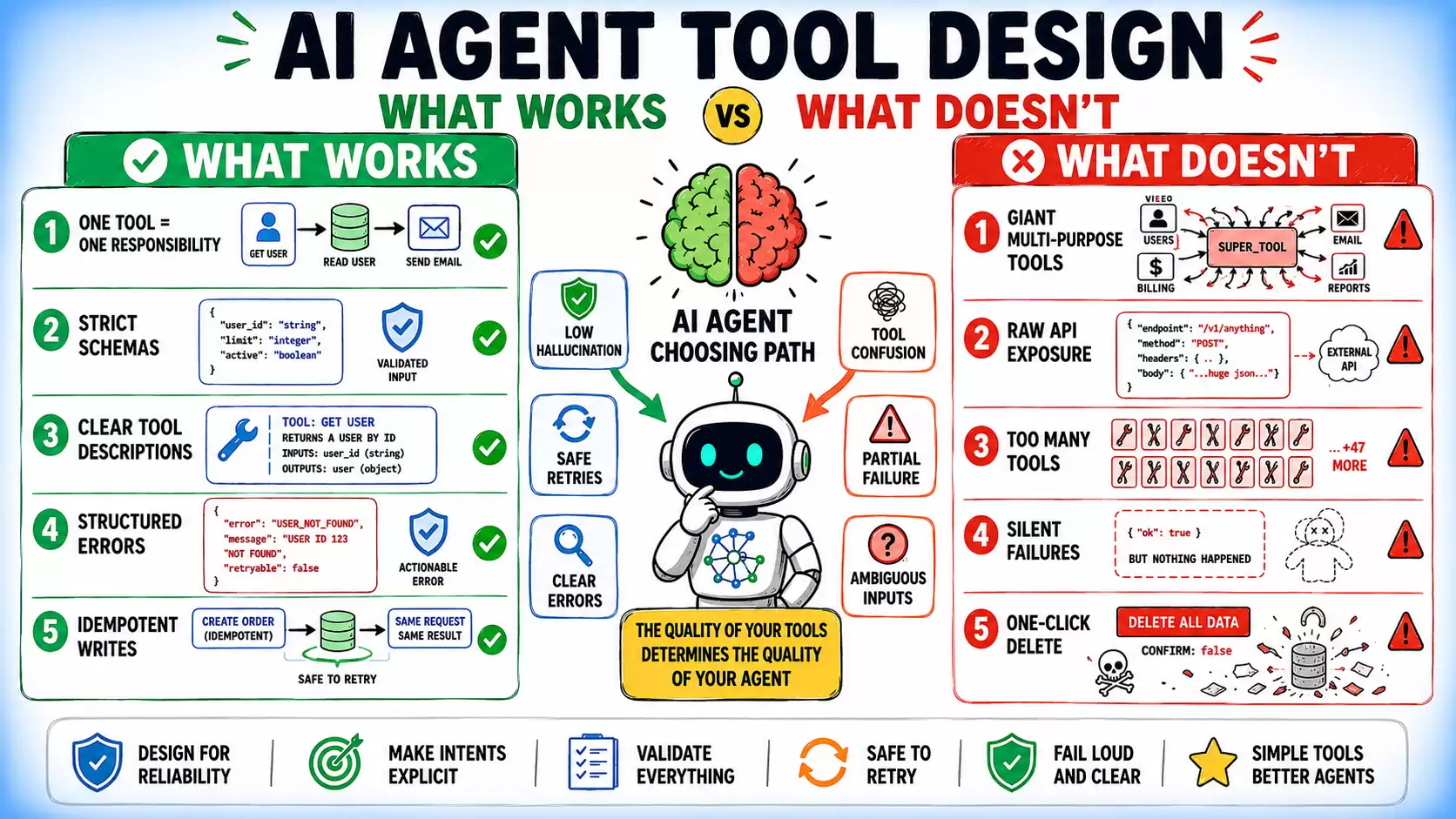
AI Agent Tool Design: What Works and What Doesn’t
Most AI agent failures look like model mistakes: choosing the wrong tool, passing bad arguments, or mishandling errors. But in practice, the model is usually working with the interface it was given. The underlying issue is often the tool design itself.
A model can only reason from the information exposed through the tool interface: the tool name, its description, the parameter schema, and the parameter descriptions. Those details shape how the model interprets intent, plans actions, and executes tasks. When the tool design is unclear, incomplete, or loosely structured, failures become predictable rather than accidental.
Problems like vague naming, ambiguous instructions, inconsistent schemas, weak parameter definitions, and poor error handling all increase the likelihood of failures. Stronger models can reduce some mistakes, but they cannot reliably compensate for a flawed interface. This article covers:
Each pattern is paired with its failure counterpart, because understanding why a design fails is as important as knowing what to replace it with.
In most agent systems, a tool should represent a single, clear operation. When one tool handles multiple behaviors through an action parameter, the model must first figure out which mode to invoke before it can solve the actual task.
The difference becomes clearer when comparing a multi-action tool against dedicated single-purpose tools:
| 1 2 3 4 5 6 7 8 9 10 11 12 13 14 15 16 17 18 19 20 21 22 23 24 25 26 27 | # Avoid: action-based multi-behavior tool@tooldef manage_customer(action: str,customer_id: str | None = None,data: dict | None = None):"""action: create | get | update | delete | suspend"""...# Prefer: single-responsibility tools@tooldef create_customer(data: CustomerInput) -> Customer:"""Create a new customer record."""...@tooldef get_customer(customer_id: str) -> Customer:"""Retrieve a customer by ID."""...@tooldef suspend_customer(customer_id: str, reason: str) -> SuspensionResult:"""Suspend a customer account."""... |
One Tool, One Responsibility
⚠️ Note: This is a useful default rather than a universal rule. Some domains — such as shell, filesystem, browser, or calendar tools — may benefit from a constrained multi-action interface because the action space itself is part of the underlying abstraction.
In tool-calling agents, the model constructs tool call arguments by reasoning from your schema.
Here’s an example:
| 1 2 3 4 5 6 7 8 9 10 11 12 13 14 15 16 17 18 19 20 21 22 | from pydantic import BaseModel, Fieldfrom enum import Enumclass Priority(str, Enum):LOW = "low"MEDIUM = "medium"HIGH = "high"class CreateTaskInput(BaseModel):title: str = Field(description="Short, actionable task title. Use imperative form: 'Review PR', not 'PR Review'.",min_length=5,max_length=100)priority: Priority = Field(description="Task priority. Use HIGH only for blockers affecting other work.",default=Priority.MEDIUM)due_date: str = Field(description="Due date in ISO 8601 format: YYYY-MM-DD. Must be a future date.",pattern=r"^d{4}-d{2}-d{2}$") |
Enums are particularly useful for fields with a small set of valid values because they eliminate a class of plausible-but-invalid outputs. Validation failures surface at the tool boundary rather than as cryptic downstream errors.
Tool descriptions are model-facing documentation. They need to do two things: explain when to use the tool, and explain when not to. Most descriptions only do the first.
| 1 2 3 4 5 6 7 8 9 10 | # Weak: explains what it does, not when not to use it"""Search for documents in the knowledge base."""# Strong: defines purpose, scope, and boundaries"""Search the internal knowledge base for documents, policies, and reference material.Use this when the user asks about company procedures, product specs, or documented workflows.Do NOT use this for real-time data (prices, availability, current status) — use get_live_data() instead.Returns up to 5 results ranked by relevance. If no results are returned, the information is not in the knowledge base.""" |
Without the disambiguation, the model infers scope from the tool name alone, which is often a reliable source of selection errors at scale. A good tool definition includes clear boundaries from other tools, not just usage instructions.
When a tool fails, the model reads the error and decides what to do next. An unhandled exception or stack trace produces noise-driven follow-up behavior. A structured error gives the model something to branch on.
Structured errors should not only report what failed but also help the agent decide what to do next. A good error format makes retry behavior explicit and gives the model a clear recovery path:
| 1 2 3 4 5 6 7 8 9 10 11 12 13 14 15 16 17 18 19 20 21 | class ToolError(BaseModel):error_code: str # machine-readable, for the model to branch onmessage: str# human-readable descriptionrecoverable: bool # can the agent retry?suggested_action: str # what the agent should do next# Record not found: retryablereturn ToolError(error_code="RECORD_NOT_FOUND",message="No user record found with ID 'usr_123'.",recoverable=True,suggested_action="Use list_users() to get valid user IDs before calling get_user().")# Quota exceeded: not retryablereturn ToolError(error_code="QUOTA_EXCEEDED",message="API quota for this tool has been reached for today.",recoverable=False,suggested_action="Notify the user and stop. Do not retry this tool today.") |
The recoverable flag and suggested_action field are what change agent behavior. Without them, models retry non-retryable errors or abandon recoverable ones.
Every tool that mutates state — creates a record, sends a message, transfers funds — must be safe to call twice. In practice, agents retry, networks fail, and the LLM loop may issue a second call because confirmation of the first never arrived.
A simple way to prevent duplicate side effects is to require an idempotency key for every write operation:
| 1 2 3 4 5 6 7 8 9 10 11 12 13 14 15 16 17 | @tooldef send_email(to: str,subject: str,body: str,idempotency_key: str = Field(description="Unique key for this send operation. Use a hash of recipient + subject + timestamp. ""Same key on retry returns the original result without re-sending.")) -> dict:"""Send an email. Idempotent: the same idempotency_key will not trigger a second send."""existing = idempotency_store.get(idempotency_key)if existing:return existingresult = email_service.send(to=to, subject=subject, body=body)idempotency_store.set(idempotency_key, result, ttl=86400)return result |
Without idempotency guarantees, transient failures can easily turn into duplicate actions.
Pointing an agent at a REST API and surfacing it as a tool is the most common shortcut and the most common source of production failures. APIs built for developers often expose far more detail than agents actually need. Responses come packed with hundreds of fields, even when only a handful are relevant. They rely on pagination, use opaque internal IDs with little contextual meaning, and return error codes that require deep domain knowledge to interpret.
A purpose-built wrapper handles pagination internally, projects only the fields the agent needs, and maps API errors to the structured ToolError format discussed above. The agent never constructs API paths or manages pages; it receives typed objects it can reason about.
That said, over-wrapping can also be harmful. If every endpoint becomes a separate, narrowly defined tool with no shared structure, the tool surface can become fragmented and harder for the model to navigate. The goal is not maximal abstraction, but a consistent, agent-friendly abstraction layer.
Accuracy degrades as the tool catalog grows. LongFuncEval, a 2025 study on tool-calling performance across long contexts, found performance drops substantially as the tool catalog size increased — even in models with 128K context windows. Loading every tool into every system prompt compounds this by consuming token budget before any task content is processed.
Dynamic tool loading addresses both problems. Determine which tools are relevant to the current step and include only those:
| 1 2 3 4 5 6 7 8 9 | STEP_TOOL_MAP = {"research": ["search_documents", "search_web", "get_url_content"],"write":["create_document", "update_document", "format_text"],"send": ["send_email", "post_to_slack", "create_calendar_event"],}def get_tools_for_step(step_type: str, available_tools: list) -> list:relevant_names = STEP_TOOL_MAP.get(step_type, [])return [t for t in available_tools if t.name in relevant_names] |
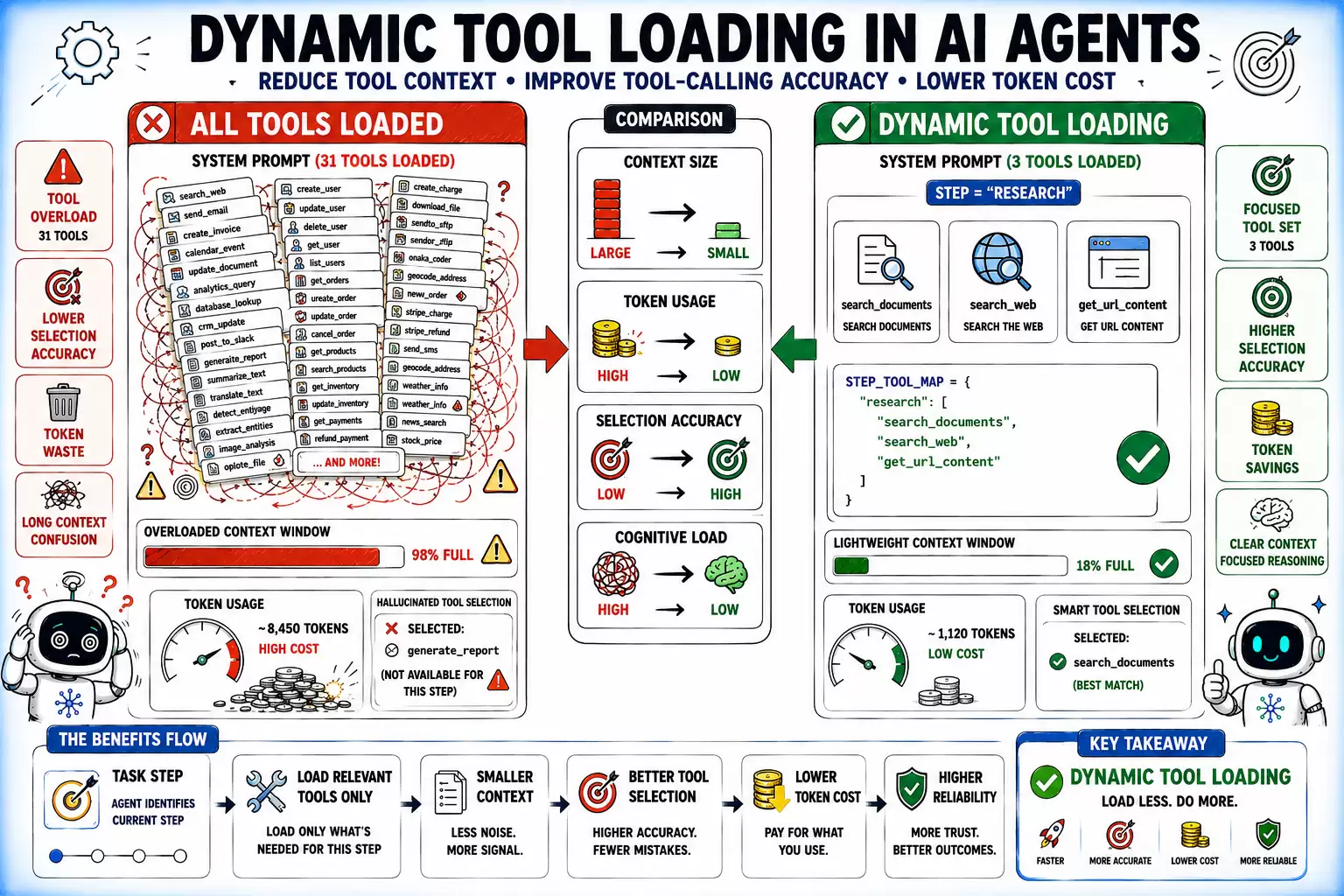
Dynamic Tool Loading
Partial success becomes a problem when a tool completes only part of the requested work but returns a response that looks fully successful. The agent continues execution with an incomplete or misleading view of the system state.
This usually happens when tools suppress internal failures and return only the successful portion of the result:
| 1 2 3 4 5 6 7 8 9 10 11 12 13 14 15 16 17 18 19 20 21 22 23 24 25 26 27 | # This version silently misleads the agent@tooldef bulk_create_tasks(tasks: list) -> dict:created = []for task in tasks:try:result = task_api.create(task)created.append(result.id)except Exception:pass# silent failure: this is the bugreturn {"created": created}# This version makes partial success explicit@tooldef bulk_create_tasks(tasks: list) -> BulkCreateResult:created, failed = [], []for task in tasks:try:created.append(task_api.create(task).id)except TaskCreationError as e:failed.append({"input": task.title, "reason": str(e)})return BulkCreateResult(created_ids=created,failed_items=failed,success=len(failed) == 0,partial_success=len(created) > 0 and len(failed) > 0) |
The partial_success flag gives the model something to branch on: retry the failed items, surface the partial result to the user, or halt the workflow.
When two tools do similar things, the model reasons about which to use on every call. That reasoning costs tokens and introduces errors. Some common examples include:
search_documents and find_documents with identical purposeget_user and fetch_user_profile with unclear differencescreate_task, add_task, and new_task as three tools for one operationIn such cases, renaming alone isn’t the fix. Every tool needs a purpose that can be described without reference to other tools in the set. If a description requires “unlike X, this one…” to make sense, that’s a design problem. Tool sprawl — too many tools with overlapping scope — is a source of unreliable agent behavior in enterprise deployments.
Any tool that takes an irreversible action — deleting records, messaging real users, executing financial transactions — needs a structural two-step confirmation, not an in-prompt “are you sure?” A staged approach introduces an explicit confirmation boundary that reduces the risk of accidental or unauthorized execution.
The safest pattern is to separate staging from execution and require a short-lived confirmation token between the two steps:
| 1 2 3 4 5 6 7 8 9 10 11 12 13 14 15 16 | @tooldef stage_deletion(record_ids: list[str], reason: str) -> StagedDeletion:"""Stage records for deletion. Does NOT delete anything.Returns a confirmation token that expires in 60 seconds.Call confirm_deletion() with this token to proceed."""token = generate_deletion_token(record_ids)staged_deletions[token] = {"ids": record_ids, "expires": now() + 60}return StagedDeletion(token=token, records_to_delete=len(record_ids), expires_in_seconds=60)@tooldef confirm_deletion(token: str) -> DeletionResult:"""Execute a staged deletion. IRREVERSIBLE. Confirm only after explicit user approval."""staged = staged_deletions.get(token)if not staged or staged["expires"] < now():raise ValueError("Token invalid or expired. Stage the deletion again.")# proceed |
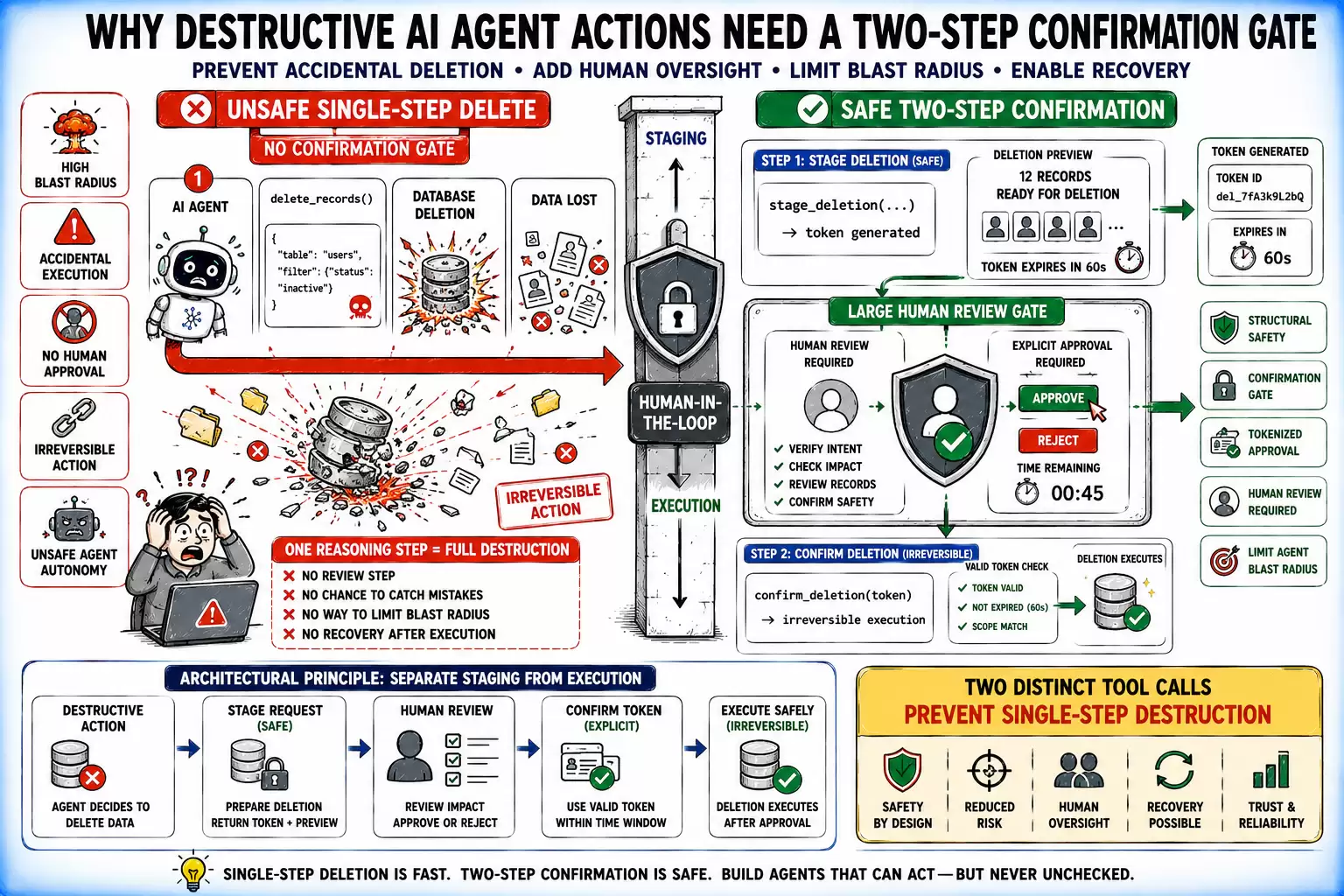
Destructive Actions Without a Confirmation Gate
⚠️ Note: Two-step safety flows, however, are often not sufficient on their own in many systems. Even when staging and confirmation are used, additional safeguards — such as short-lived, single-use tokens, strict session binding, and replay protection — are necessary to prevent token reuse, leakage, or cross-session execution that can bypass the intended safety boundary.
Every row represents a key decision in AI agent tool design:
| Design Area | Works | Doesn’t Work |
|---|---|---|
| Tool Scope | Single responsibility per tool | Action-parameter tools like manage_database(action="create") |
| Schema | Tight: enums, validators, typed fields | Loose: free strings, untyped dicts |
| Descriptions | Include scope boundaries and when not to use | Happy path only |
| Write Operations | Idempotent with idempotency keys | Fire-and-forget, no retry safety |
| Error Returns | Structured: error_code, recoverable, suggested_action | Unhandled exceptions or untyped strings |
| Tool Count | Dynamic loading per step | All tools in every context |
| API Wrapping | Purpose-built wrapper with agent-facing schema | Unfiltered API exposure |
| Partial Success | Explicit partial_success field in return | Silent exception swallowing |
| Destructive Actions | Two-step staging + confirmation | Single-call delete/send/execute |
| Tool Overlap | Semantically distinct, audited before deploy | Similar names and descriptions competing |
Writing effective tools for AI agents — using AI agents from Anthropic is a useful reference on tool design.
大家都在看

Copyright(C) 2020-2026 jiyx.com All Rights Reserved 联系方式:[email protected]