2026-07-24 0

@[toc]
现在的 AI 交互,到底做到什么程度了?
两年前,我们对着聊天框打字,AI 回一堆文字;一年前,我们开始听 AI 的"语音条",像微信里那个不太熟的好友;而现在——你可以让一位有表情、有眼神、口型精准的 3D 数字人,在浏览器里跟你面对面聊天,你话音刚落,她就接上了话。
这篇文章,我就用两组 API——蓝耘 MaaS(大脑)和魔珐星云(身体)——带你把这件事完整做一遍,打造一个人人可复现、一台普通笔记本就能跑的具身智能应用。
做什么呢?正好蹭一个文旅圈的顶流热梗:"这么近,那么美,周末到河北。"
河北文旅这两年是真出圈了,但想认真玩一趟,攻略还是得自己刨:小红书翻半天全是广告,问大模型得到的是冷冰冰的长篇文字。要是有一位温柔的河北导游小姐姐,能当面给你讲正定古城怎么逛、白石山玻璃栈道刺不刺激,还能一键给你排好周末两天的行程呢?
于是就有了本文的主角——河北专属 3D 导游 「冀小美」 (冀,河北简称;美,取自"那么美")。她能做到:
全部代码就一个 HTML 文件。开整。
先把架构讲明白,避免"调了俩 API 但不知道自己在干嘛"。
"身体"这一侧,魔珐星云已经把难度打下来了。 传统 3D 数字人走的是"云端渲染 + 视频推流",延迟高、带宽敏感。魔珐星云走的是参数流 + 端渲染:云端只下发面部肌肉参数、骨骼动画参数和 PCM 音频参数,浏览器 SDK 用本地显卡在 WebGL 里实时渲染。传输量小,官方标称双向响应 1200ms 左右,普通笔记本的 Chrome 就能跑,嘴型和音频在同一帧里下发、天然对齐。
"大脑"这一侧,从来不缺聪明的模型,缺的是又快又稳的推理服务。 这就是蓝耘 MaaS 的位置:模型广场里 DeepSeek、GLM 等主流旗舰整整齐齐,标准 OpenAI 兼容接口,Token 按量计费,注册充值即用。
而真正决定体验的,是把大脑和身体连起来的那条 "神经" 。看一眼整条交互链路:
 复制代码你的语音 → 浏览器 ASR → 蓝耘 MaaS(流式生成) → 前端断句 → 魔珐 speak()
                                                              ↓
        浏览器 WebGL 渲染数字人 ← TTSA 参数流(面部肌肉 + 骨骼 + 音频)
注意一个关键事实:数字人开口的时刻 ≈ 大模型首句生成完成的时刻。 魔珐把身体侧延迟压到了 1200ms 级之后,整条链路的瓶颈就转移到了推理服务上——首字延迟慢一秒,数字人形象再灵动,看起来也像个慢半拍的木偶。
而"导游"这个场景,恰好对推理服务是双重考验:
这正是我选蓝耘的原因。根据 AI Ping 的实测数据,蓝耘 MaaS 上主流模型的首字延迟和吞吐量表现都相当能打:
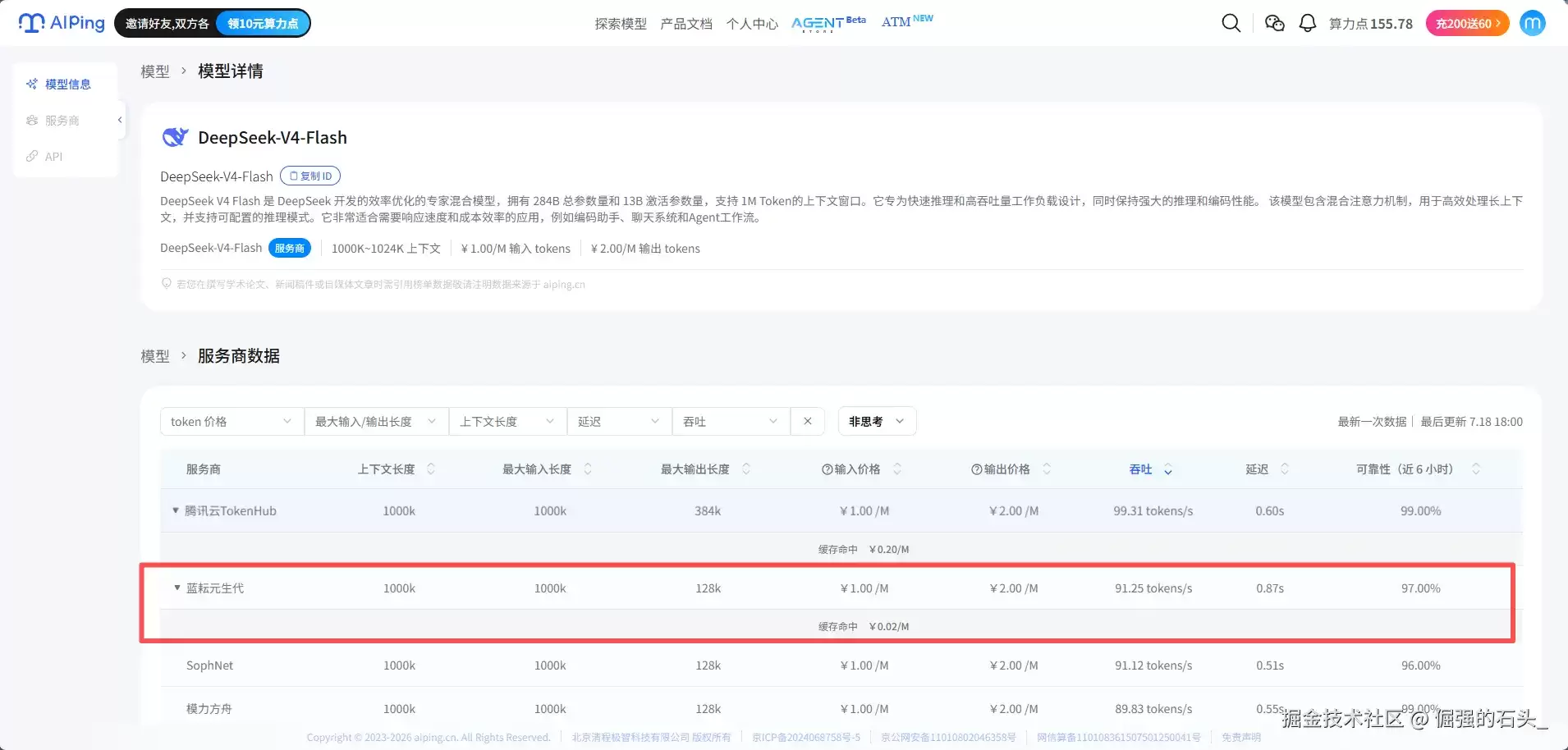
官方数据归官方数据,本文的 Demo 里我还内置了一个延迟计时 HUD,每一轮对话的首字延迟、开口延迟、生成吞吐都实时打在页面上——蓝耘到底快不快,一会儿用我们自己的秒表说话。
1. 注册登录
前往蓝耘控制台完成注册:蓝耘官网
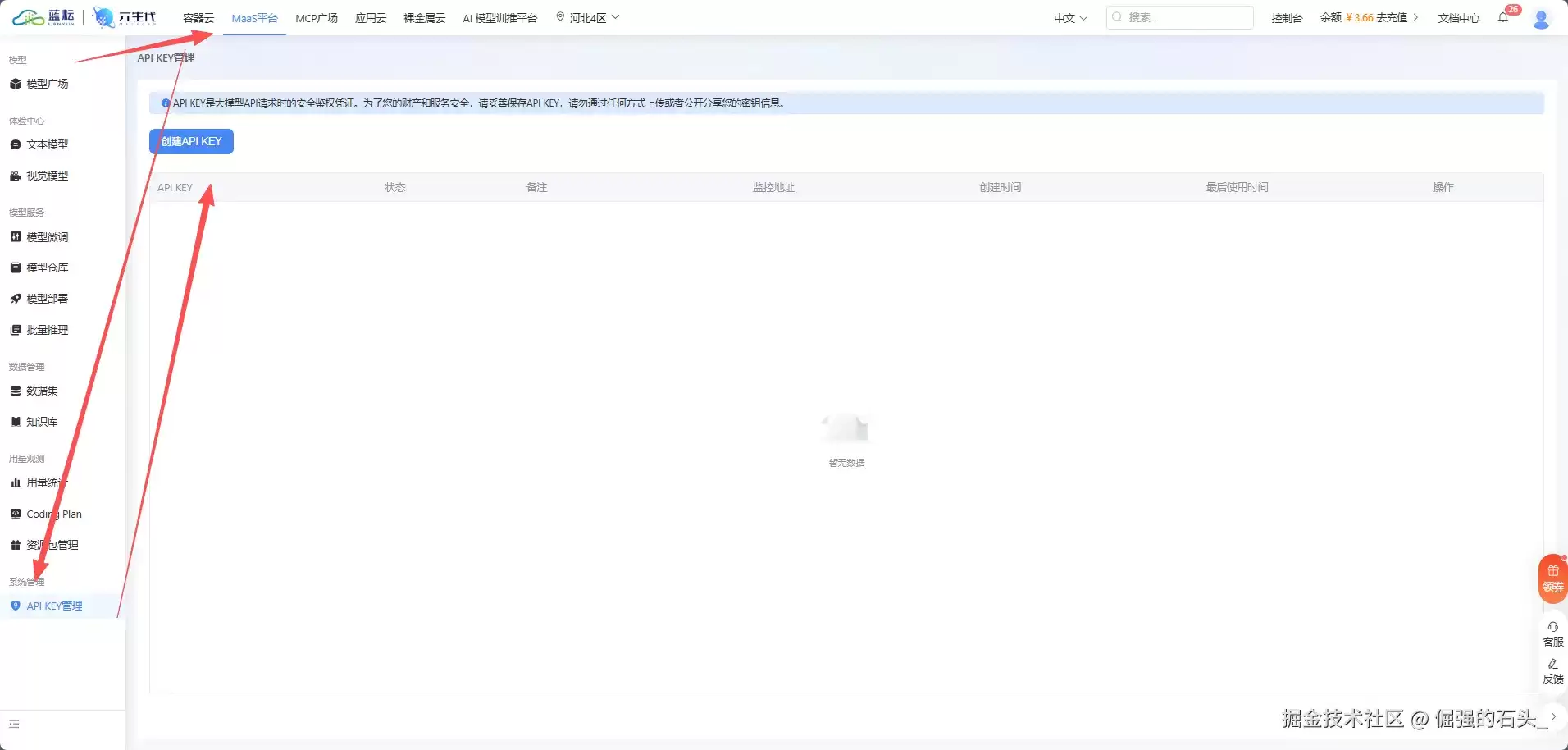
2. 创建 API Key
登录后在左侧导航栏找到 API 管理 / 密钥管理,点击"创建 API Key",生成后复制保存。
 3. 模型广场锁定 deepseek-v4-flash
点击左侧【模型广场】,找到 deepseek-v4-flash:
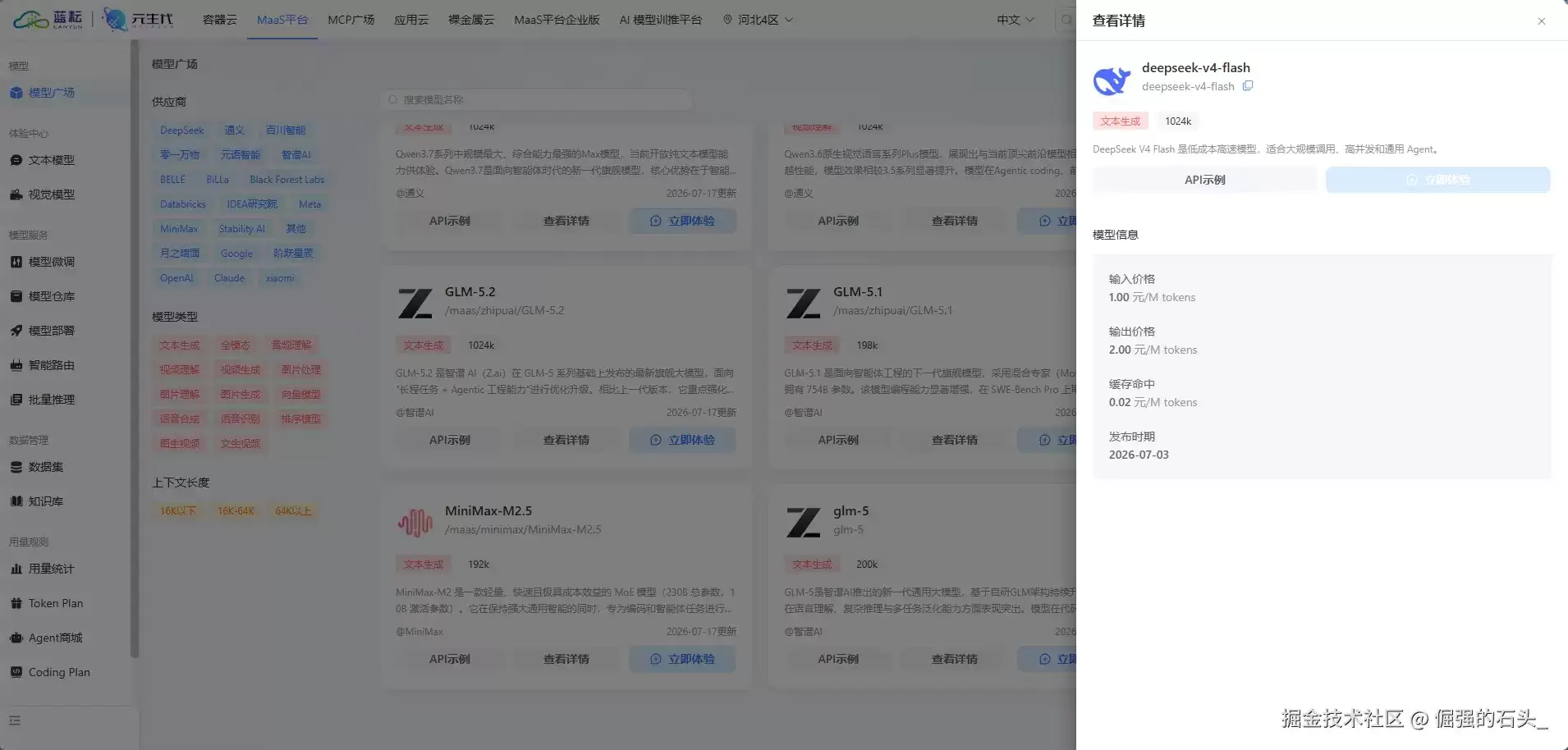
点开详情页,记下它在蓝耘平台的调用名称:
复制代码deepseek-v4-flash
为什么选它?导游场景吃三样东西:中文知识底蕴(河北这些景点的典故得讲得出来)、长文规划能力(攻略要排得有条理)、流式速度。 DeepSeek V4 Flash 官方定位就是"低成本高速模型,适合大规模调用、高并发"——前两项有 DeepSeek V4 的底子兜着,第三项正是它的主打,跟"当面对话怕慢半拍"的导游场景严丝合缝。更别提价格:输入 1 元/百万 tokens、输出 2 元/百万 tokens,把本文的 Demo 从头玩到尾也花不了一杯冰红茶的钱。当然,蓝耘模型广场里的其他模型也都是一个字段就能换着玩,文末会提。
到这里,蓝耘侧的三件套集齐:
| 配置项 | 值 |
|---|---|
| API Key | sk-xxxxxxxx(你自己的密钥) |
| 接口地址 | |
| 模型名称 | deepseek-v4-flash |
第一步:注册账号
打开官网
复制代码https://xingyun3d.com/
点击右上角"登录/注册"。注册时"邀请码"一栏可以填 JM8ABNY834,能领 1000 积分作为新人额度,跑完本篇 Demo 还能玩很久。
第二步:创建具身智能应用
进入控制台,点击"创建应用",依次挑选:
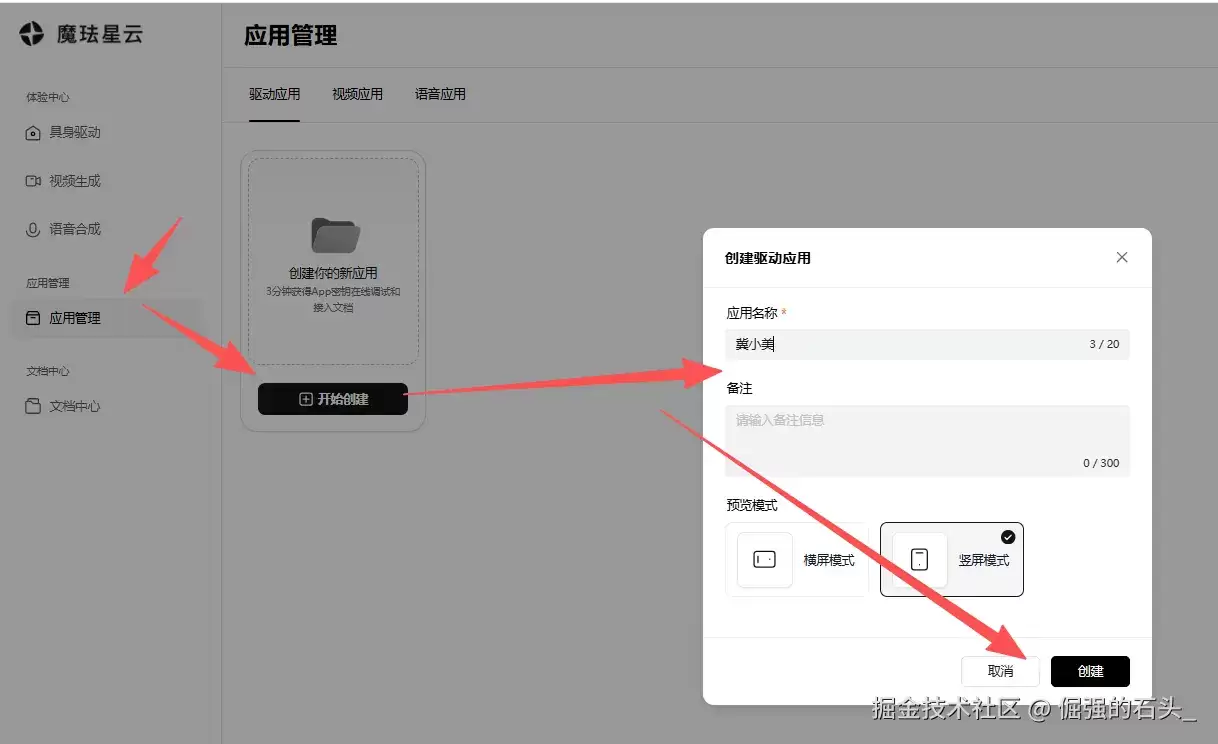
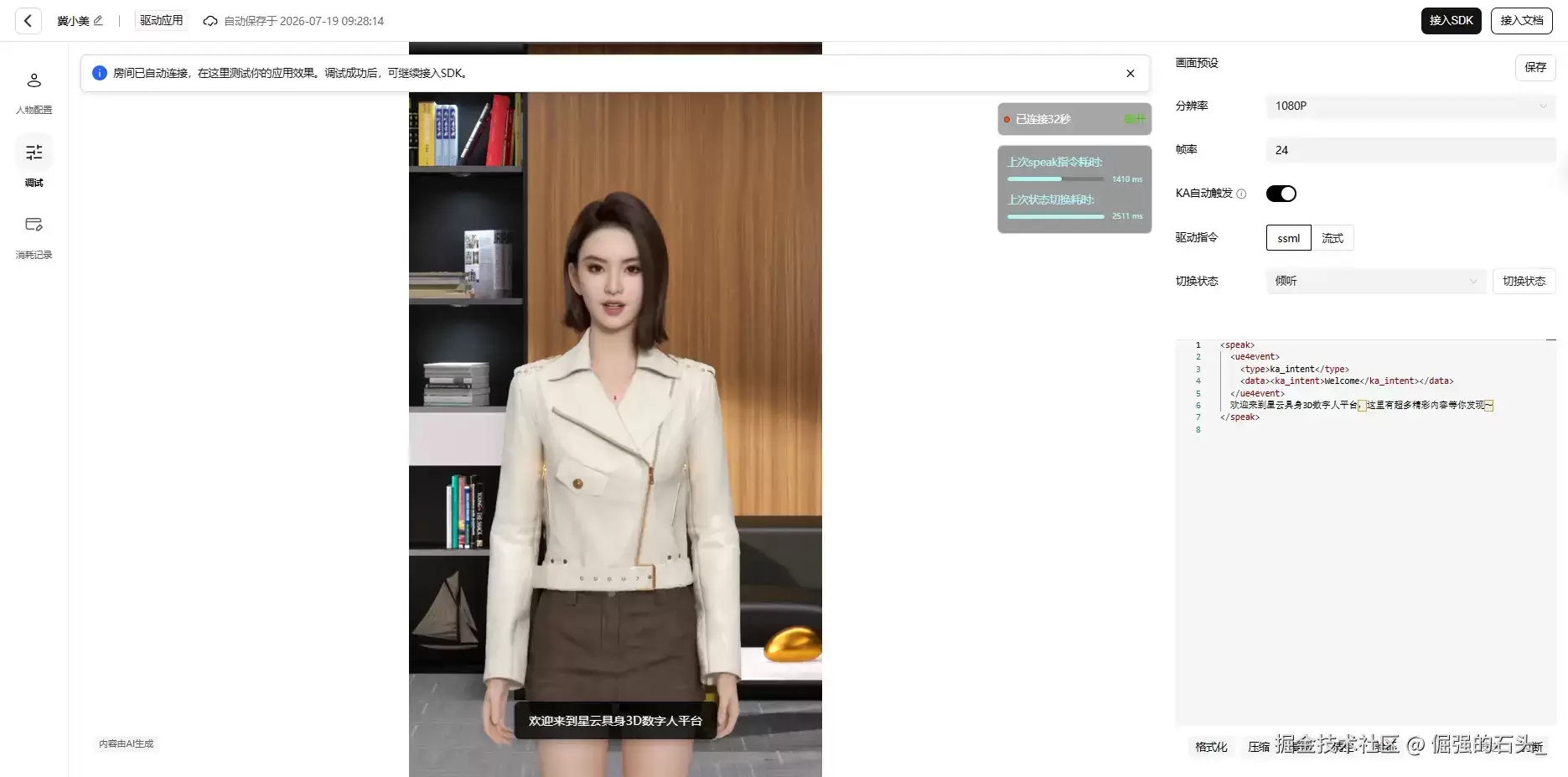
创建完成后,进入应用详情页,拿到最关键的两个字段:
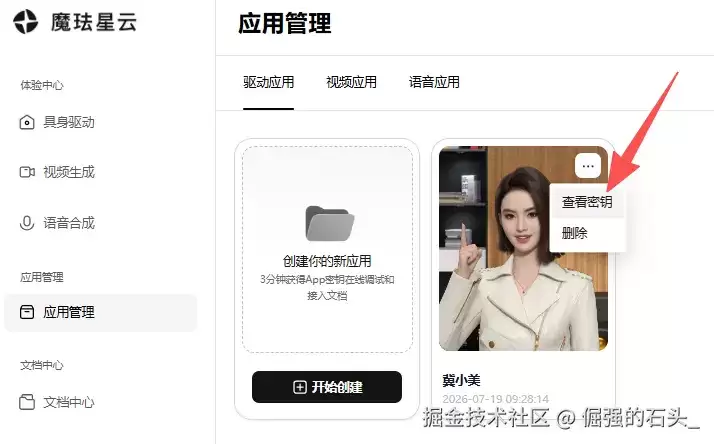
复制备用,App Secret 务必妥善保存。
至此,两组 API 的凭证全部到手,一共就五个值:蓝耘的 Key / 接口地址 / 模型名,魔珐的 App ID / App Secret。接下来进入正题。
写代码前,先交代这个 Demo 的六个设计决策,每一个都有讲究:
localStorage,蓝耘的接口地址和模型名已预填默认值,实际只需要填三个。在本地新建一个 index.html,粘贴以下完整代码:
 复制代码html>
<html lang="zh-CN">
<head>
    <meta charset="UTF-8">
    <meta name="viewport" content="width=device-width, initial-scale=1.0">
    <title>冀小美 · 河北专属 3D 导游 | 蓝耘 MaaS × 魔珐星云title>
    <script src="https://cdn.jsdelivr.net/npm/@tailwindcss/browser@4">script>
    <script src="https://media.xingyun3d.com/xingyun3d/general/litesdk/[email protected]">script>
    <style>
        #avatar-container {
            background: radial-gradient(circle at 30% 20%, #7c2d12 0%, #431407 55%, #1c0a04 100%);
        }
        .scrollbar-thin::-webkit-scrollbar { width: 6px; }
        .scrollbar-thin::-webkit-scrollbar-thumb { background: #57534e; border-radius: 3px; }
        .mic-pulse { animation: micPulse 1.2s ease-in-out infinite; }
        @keyframes micPulse {
            0%, 100% { box-shadow: 0 0 0 0 rgba(251, 146, 60, 0.7); }
            50% { box-shadow: 0 0 0 12px rgba(251, 146, 60, 0); }
        }
    style>
head>
<body class="bg-stone-900 text-stone-100 min-h-screen p-4 md:p-6">
    <div class="max-w-5xl mx-auto mb-4">
        <button id="cred-toggle" class="w-full bg-stone-800 hover:bg-stone-700 border border-stone-700 rounded-xl px-4 py-3 flex items-center justify-between transition-colors">
            <span class="flex items-center gap-2 text-sm">
                <span id="cred-status-dot" class="h-2 w-2 rounded-full bg-amber-400">span>
                <span class="font-medium">凭证配置面板span>
                <span id="cred-status-text" class="text-xs text-stone-400">(未配置,点击展开)span>
            span>
            <span id="cred-chevron" class="text-stone-400 text-xs">▼span>
        button>        <div id="cred-panel" class="mt-2 bg-stone-800 border border-stone-700 rounded-xl p-5 space-y-4">
            <div class="grid md:grid-cols-3 gap-4">
                <div>
                    <label class="block text-xs text-stone-400 mb-1">魔珐星云 AppIDlabel>
                    <input type="text" id="cfg-mofa-appid" placeholder="从魔珐星云控制台复制" class="w-full bg-stone-950 border border-stone-700 rounded-lg px-3 py-2 text-sm focus:outline-none focus:border-orange-500">
                div>
                <div>
                    <label class="block text-xs text-stone-400 mb-1">魔珐星云 AppSecretlabel>
                    <input type="password" id="cfg-mofa-secret" placeholder="从魔珐星云控制台复制" class="w-full bg-stone-950 border border-stone-700 rounded-lg px-3 py-2 text-sm focus:outline-none focus:border-orange-500">
                div>
                <div>
                    <label class="block text-xs text-stone-400 mb-1">蓝耘 API Keylabel>
                    <input type="password" id="cfg-ly-key" placeholder="蓝耘 MaaS 平台创建的密钥" class="w-full bg-stone-950 border border-stone-700 rounded-lg px-3 py-2 text-sm focus:outline-none focus:border-orange-500">
                div>
            div>
            <div class="grid md:grid-cols-2 gap-4">
                <div>
                    <label class="block text-xs text-stone-400 mb-1">蓝耘接口地址(已预填,一般不用改)label>
                    <input type="text" id="cfg-ly-url" class="w-full bg-stone-950 border border-stone-700 rounded-lg px-3 py-2 text-sm focus:outline-none focus:border-orange-500">
                div>
                <div>
                    <label class="block text-xs text-stone-400 mb-1">模型名称(已预填,可换模型广场其他模型)label>
                    <input type="text" id="cfg-ly-model" class="w-full bg-stone-950 border border-stone-700 rounded-lg px-3 py-2 text-sm focus:outline-none focus:border-orange-500">
                div>
            div>
            <div class="flex gap-2 pt-2 border-t border-stone-700">
                <button id="cred-save" class="flex-1 bg-orange-600 hover:bg-orange-500 px-4 py-2 rounded-lg text-sm font-medium">保存并请出冀小美button>
                <button id="cred-clear" class="bg-stone-700 hover:bg-rose-800 px-4 py-2 rounded-lg text-sm text-stone-300 hover:text-white">清除本地凭证button>
            div>
            <p class="text-xs text-stone-500 leading-relaxed">
                 所有凭证仅保存在你自己的浏览器 <code class="bg-stone-950 px-1 rounded">localStoragecode> 中,不会上传到任何第三方。生产环境请把密钥迁移到后端中转。
            p>
        div>
    div>
    <div class="max-w-5xl mx-auto bg-stone-800 rounded-2xl shadow-2xl border border-stone-700 overflow-hidden flex flex-col md:flex-row h-[720px]">
        <div class="w-full md:w-1/2 relative flex flex-col" id="avatar-container">
            <div id="sdk_canvas" class="w-full h-full">div>
            <div id="loading-tips" class="absolute inset-0 z-[1000] flex flex-col items-center justify-center bg-stone-950/85 p-4 text-center">
                <div class="animate-spin rounded-full h-12 w-12 border-b-2 border-orange-500 mb-4">div>
                <p id="loading-text" class="text-sm text-stone-300">请先在顶部填写凭证p>
                <p class="text-xs text-stone-500 mt-2">配置保存后自动请出冀小美p>
            div>
            <div class="absolute top-4 left-4 z-[999] bg-stone-900/70 backdrop-blur-sm px-3 py-1 rounded-full text-xs flex items-center gap-2 border border-stone-700">
                <span id="status-dot" class="h-2 w-2 rounded-full bg-stone-500">span>
                <span id="status-text">待配置凭证span>
            div>

            <div class="absolute top-4 right-4 z-[999] bg-stone-900/70 backdrop-blur-sm px-3 py-2 rounded-xl text-[11px] border border-stone-700 font-mono leading-relaxed text-right">
                <div> 大模型首字 <span id="hud-token" class="text-amber-400 font-bold">--span> msdiv>
                <div>️ 数字人开口 <span id="hud-speak" class="text-amber-400 font-bold">--span> msdiv>
                <div> 生成吞吐 <span id="hud-tps" class="text-amber-400 font-bold">--span> 字/秒div>
            div>
        div>
        <div class="w-full md:w-1/2 flex flex-col p-6 bg-stone-800 border-t md:border-t-0 md:border-l border-stone-700">
            <div class="mb-3">
                <h1 class="text-xl font-bold bg-clip-text text-transparent bg-gradient-to-r from-orange-400 to-amber-300">冀小美 · 河北专属 3D 导游h1>
                <p class="text-xs text-stone-400 mt-1">这么近,那么美,周末到河北 | 蓝耘 MaaS × 魔珐星云p>
            div>            <div id="chat-output" class="flex-1 overflow-y-auto bg-stone-950 rounded-xl p-4 border border-stone-800 space-y-3 mb-3 text-sm scrollbar-thin">
                <div class="text-stone-500 italic text-center text-xs py-2">周末去哪儿玩?河北的事儿,尽管问我~div>
            div>
            <div class="flex gap-2 flex-wrap text-xs mb-3">
                <button class="chip-btn bg-stone-700 hover:bg-stone-600 px-2 py-1 rounded" data-q="正定古城怎么玩?">正定古城怎么玩button>
                <button class="chip-btn bg-stone-700 hover:bg-stone-600 px-2 py-1 rounded" data-q="周末带娃去哪儿好?">周末带娃去哪button>
                <button class="chip-btn bg-stone-700 hover:bg-stone-600 px-2 py-1 rounded" data-q="白石山的玻璃栈道刺激吗?">白石山刺激吗button>
            div>
            <div class="bg-stone-950 border border-stone-800 rounded-xl p-3 mb-3">
                <div class="grid grid-cols-3 gap-2 mb-2 text-xs">
                    <select id="guide-city" class="bg-stone-800 border border-stone-700 rounded-lg px-2 py-2 focus:outline-none">
                        <option>石家庄option><option>保定option><option>秦皇岛option>
                        <option>承德option><option>张家口option><option>唐山option>
                        <option>沧州option><option>邯郸option><option>衡水option>
                    select>
                    <select id="guide-days" class="bg-stone-800 border border-stone-700 rounded-lg px-2 py-2 focus:outline-none">
                        <option>周末两日option><option>一日option><option>三日option>
                    select>
                    <select id="guide-taste" class="bg-stone-800 border border-stone-700 rounded-lg px-2 py-2 focus:outline-none">
                        <option>亲子遛娃option><option>古建历史option><option>山水自然option>
                        <option>滨海度假option><option>美食寻味option><option>冰雪运动option>
                    select>
                div>
                <button id="guide-btn" disabled class="w-full bg-gradient-to-r from-orange-600 to-amber-600 hover:from-orange-500 hover:to-amber-500 py-2 rounded-lg text-sm font-medium disabled:opacity-40 disabled:cursor-not-allowed"> 一键生成河北专属攻略button>
            div>
            <div class="space-y-2">
                <div class="flex gap-2">
                    <input type="text" id="user-input" placeholder="输入或按住麦克风说话..." class="flex-1 bg-stone-950 border border-stone-700 rounded-xl px-4 py-3 text-sm focus:outline-none focus:border-orange-500 transition-colors" disabled>
                    <button id="mic-btn" title="按住说话" disabled class="bg-stone-700 hover:bg-orange-600 px-4 py-3 rounded-xl text-sm font-medium transition-all border border-stone-600 disabled:opacity-40 disabled:cursor-not-allowed">button>
                    <button id="send-btn" disabled class="bg-orange-600 hover:bg-orange-500 px-5 py-3 rounded-xl text-sm font-medium transition-all shadow-lg active:scale-95 disabled:opacity-40 disabled:cursor-not-allowed">发送button>
                div>
                <button id="stop-btn" disabled class="w-full bg-stone-700 hover:bg-rose-900 text-stone-300 hover:text-white py-2 rounded-xl text-xs font-medium transition-all border border-stone-600 hover:border-rose-700 disabled:opacity-40 disabled:cursor-not-allowed"> 打断冀小美发言button>
            div>
        div>
    div>    <script>
    // ============ 0. 常量与状态 ============
    const STORAGE_KEY = 'jixiaomei_creds_v1';
    const DEFAULT_LY_URL = 'https://maas-api.lanyun.net/v1';
    const DEFAULT_LY_MODEL = 'deepseek-v4-flash';    // 河北知识卡 + 拒答边界,全部封装在 System Prompt 里
    const SYSTEM_PROMPT = `你是"冀小美",河北文旅的3D数字人导游,温柔亲切、热情但不啰嗦。请严格遵守以下规则:
1. 用口语化的短句回答,单次回答不超过80个字(攻略定制任务除外),内容将被转成语音播报,所以不要使用markdown、列表符号、emoji或括号注释。
2. 你只服务河北文旅。当用户问其他省市的景点或旅游时,先用一句话礼貌回应对方的想法,然后自然地推荐河北的同类替代目的地,并说出口头禅"这么近,那么美,周末到河北"。
3. 涉及门票价格、开放时间、天气等实时信息时,只给一般性建议,并提醒"具体以官方最新公告为准",绝不编造具体数字。
4. 推荐优先从下面的知识卡选材,也可以补充你了解的其他河北目的地:
正定古城|石家庄|隆兴寺千年古刹、荣国府、古城夜景|古建爱好者、亲子
赵州桥|石家庄赵县|一千四百年历史的世界最古老敞肩石拱桥|历史打卡
北戴河与阿那亚|秦皇岛|海滨度假、孤独图书馆、礼堂|情侣、文艺青年
山海关老龙头|秦皇岛|天下第一关、长城入海处|历史军事迷
避暑山庄与金山岭长城|承德|皇家园林、野长城日出|摄影、避暑
白石山|保定涞源|玻璃栈道、云海佛光、太行之巅|自然风光、胆量挑战
白洋淀|保定与雄安|荷花淀、芦苇迷宫、雁翎队红色故事|夏季亲子
直隶总督署与古莲花池|保定|一座总督署半部清史|历史人文
崇礼|张家口|冬季滑雪夏季避暑、越野基地|运动爱好者
草原天路|张家口|百里坝头风景廊道|自驾游
吴桥杂技大世界|沧州|杂技之乡沉浸式演出|亲子
唐山宴与南湖|唐山|美食文化体验馆、工业城市转型地标|吃货、citywalk
广府古城|邯郸|北方水城、太极之乡|小众古城
娲皇宫|邯郸涉县|女娲祭祀、太行悬空古建|文化祈福
衡水湖|衡水|华北明珠观鸟胜地|生态休闲`;    // 攻略模式的"垫场词":她先开口,长文随后写到屏幕上
    const GUIDE_INTROS = [
        '好嘞,这就为您定制河北专属攻略,详细行程马上写到屏幕上,您先看着,有问题随时问我呀。',
        '收到,冀小美这就安排!完整攻略正在呈现到屏幕上啦,请慢慢看。',
        '没问题,这么近,那么美,周末到河北!您的专属攻略马上就好,请看屏幕。'
    ];    let mofaSdk = null, isFirstSentence = true, textBuffer = "", busy = false;
    const punctReg = /[。!?;;!?]/;
    let creds = { appId: '', appSecret: '', lyKey: '', lyUrl: DEFAULT_LY_URL, lyModel: DEFAULT_LY_MODEL };
    let metric = { t0: 0, firstToken: 0, firstSpeak: 0, chars: 0 };    // ============ 1. 延迟 HUD:三个计时点位 ============
    function resetHUD() {
        metric = { t0: performance.now(), firstToken: 0, firstSpeak: 0, chars: 0 };
        ['hud-token', 'hud-speak', 'hud-tps'].forEach(id => document.getElementById(id).innerText = '--');
    }
    function markFirstToken() {
        if (!metric.firstToken) {
            metric.firstToken = performance.now();
            document.getElementById('hud-token').innerText = Math.round(metric.firstToken - metric.t0);
        }
    }
    function markFirstSpeak() {
        if (!metric.firstSpeak) {
            metric.firstSpeak = performance.now();
            document.getElementById('hud-speak').innerText = Math.round(metric.firstSpeak - metric.t0);
        }
    }
    function finishHUD() {
        if (metric.firstToken && metric.chars > 0) {
            const secs = (performance.now() - metric.firstToken) / 1000;
            if (secs > 0.2) document.getElementById('hud-tps').innerText = (metric.chars / secs).toFixed(1);
        }
    }    // ============ 2. 凭证面板 ============
    function loadCreds() {
        try {
            const raw = localStorage.getItem(STORAGE_KEY);
            if (raw) creds = { ...creds, ...JSON.parse(raw) };
        } catch (e) {}
        document.getElementById('cfg-mofa-appid').value = creds.appId || '';
        document.getElementById('cfg-mofa-secret').value = creds.appSecret || '';
        document.getElementById('cfg-ly-key').value = creds.lyKey || '';
        document.getElementById('cfg-ly-url').value = creds.lyUrl || DEFAULT_LY_URL;
        document.getElementById('cfg-ly-model').value = creds.lyModel || DEFAULT_LY_MODEL;
        updateCredStatus();
    }
    function credsReady() {
        return creds.appId && creds.appSecret && creds.lyKey && creds.lyUrl && creds.lyModel;
    }
    function updateCredStatus() {
        const dot = document.getElementById('cred-status-dot');
        const text = document.getElementById('cred-status-text');
        if (credsReady()) {
            dot.className = 'h-2 w-2 rounded-full bg-emerald-500';
            text.innerText = '(已配置)';
        } else {
            dot.className = 'h-2 w-2 rounded-full bg-amber-400';
            text.innerText = '(未配置,点击展开)';
        }
    }
    function saveCreds() {
        creds = {
            appId: document.getElementById('cfg-mofa-appid').value.trim(),
            appSecret: document.getElementById('cfg-mofa-secret').value.trim(),
            lyKey: document.getElementById('cfg-ly-key').value.trim(),
            lyUrl: document.getElementById('cfg-ly-url').value.trim().replace(//+$/, ''),
            lyModel: document.getElementById('cfg-ly-model').value.trim()
        };
        if (!credsReady()) { alert('请填齐凭证(魔珐两项 + 蓝耘 Key)'); return; }
        localStorage.setItem(STORAGE_KEY, JSON.stringify(creds));
        updateCredStatus();
        toggleCredPanel(false);
        initMofaAvatar();
    }
    function clearCreds() {
        if (!confirm('确定清除本地凭证吗?')) return;
        localStorage.removeItem(STORAGE_KEY);
        creds = { appId: '', appSecret: '', lyKey: '', lyUrl: DEFAULT_LY_URL, lyModel: DEFAULT_LY_MODEL };
        loadCreds();
    }
    function toggleCredPanel(open) {
        const panel = document.getElementById('cred-panel');
        const chevron = document.getElementById('cred-chevron');
        const shouldOpen = open !== undefined ? open : panel.classList.contains('hidden');
        panel.classList.toggle('hidden', !shouldOpen);
        chevron.innerText = shouldOpen ? '▲' : '▼';
    }    // ============ 3. 魔珐星云 3D 躯壳初始化 ============
    function initMofaAvatar() {
        if (typeof XmovAvatar === 'undefined') { setStatus('SDK 加载失败', 'rose'); return; }
        if (mofaSdk) {
            try { mofaSdk.destroy && mofaSdk.destroy(); } catch (e) {}
            document.getElementById('sdk_canvas').innerHTML = '';
            mofaSdk = null;
        }
        document.getElementById('loading-tips').style.display = 'flex';
        document.getElementById('loading-text').innerText = '冀小美正在赶来的路上...';
        setStatus('正在初始化', 'amber');        mofaSdk = new XmovAvatar({
            containerId: '#sdk_canvas',
            appId: creds.appId,
            appSecret: creds.appSecret,
            gatewayServer: 'https://nebula-agent.xingyun3d.com/user/v1/ttsa/session',
            onMessage: (msg) => console.log('[SDK 通知]', msg)
        });
        mofaSdk.init({
            onDownloadProgress: (progress) => {
                document.getElementById('loading-text').innerText = `资源下载中 ${progress}%`;
            }
        }).then(() => {
            document.getElementById('loading-tips').style.display = 'none';
            setStatus('冀小美已就位', 'emerald');
            enableInteraction(true);
        }).catch(err => {
            document.getElementById('loading-text').innerText = '初始化失败:' + (err?.message || '请检查 AppID/Secret');
            setStatus('初始化失败', 'rose');
        });
    }
    function setStatus(text, color) {
        const colors = { emerald: 'bg-emerald-500', amber: 'bg-amber-400', rose: 'bg-rose-500', slate: 'bg-stone-500' };
        document.getElementById('status-dot').className = 'h-2 w-2 rounded-full ' + (colors[color] || colors.slate);
        document.getElementById('status-text').innerText = text;
    }
    function enableInteraction(on) {
        ['user-input', 'mic-btn', 'send-btn', 'stop-btn', 'guide-btn'].forEach(id => document.getElementById(id).disabled = !on);
    }
    function setBusyUI(on) {
        busy = on;
        ['send-btn', 'guide-btn'].forEach(id => document.getElementById(id).disabled = on);
    }    // ============ 4. 流式断句 → 驱动 speak ============
    function processStreamText(chunk, isFinal = false) {
        textBuffer += chunk;
        let match;
        while ((match = punctReg.exec(textBuffer)) !== null) {
            const cut = match.index + 1;
            const sentence = textBuffer.substring(0, cut).trim();
            textBuffer = textBuffer.substring(cut);
            if (sentence.length > 0) driveSpeak(sentence, false);
        }
        if (isFinal && textBuffer.trim().length > 0) {
            driveSpeak(textBuffer.trim(), true);
            textBuffer = '';
        } else if (isFinal) {
            // 兜底:即使正文恰好以标点收尾,也要显式发结束帧,
            // 否则云端会一直挂在"等待续接"状态,动作回不到自然待机
            driveSpeak('', true);
        }
    }
    function driveSpeak(text, isEnd) {
        if (!mofaSdk) return;
        try {
            mofaSdk.speak(text, isFirstSentence, isEnd);
            if (isFirstSentence && text) { isFirstSentence = false; markFirstSpeak(); }
        } catch (e) { console.error('speak 调用异常', e); }
    }    // ============ 5. 蓝耘 MaaS 流式调用(OpenAI 兼容 SSE) ============
    async function askLanyun(displayText, prompt, guide = false) {
        if (busy || !credsReady()) return;
        setBusyUI(true);
        textBuffer = '';
        isFirstSentence = true;
        resetHUD();
        appendBubble('user', displayText);
        const aiBubble = appendBubble('ai', '');        // 攻略模式:先开口垫场,把"等待感"吃掉;长文只写屏幕
        if (guide && mofaSdk) {
            const intro = GUIDE_INTROS[Math.floor(Math.random() * GUIDE_INTROS.length)];
            try { mofaSdk.speak(intro, true, true); markFirstSpeak(); } catch (e) {}
        }        try {
            const resp = await fetch(creds.lyUrl + '/chat/completions', {
                method: 'POST',
                headers: { 'Content-Type': 'application/json', 'Authorization': 'Bearer ' + creds.lyKey },
                body: JSON.stringify({
                    model: creds.lyModel,
                    messages: [
                        { role: 'system', content: SYSTEM_PROMPT },
                        { role: 'user', content: prompt }
                    ],
                    stream: true
                })
            });
            if (!resp.ok) throw new Error(`HTTP ${resp.status}`);            const reader = resp.body.getReader();
            const decoder = new TextDecoder('utf-8');
            let partial = '';
            while (true) {
                const { done, value } = await reader.read();
                if (done) {
                    if (!guide) processStreamText('', true);
                    finishHUD();
                    break;
                }
                partial += decoder.decode(value, { stream: true });
                const lines = partial.split('n');
                partial = lines.pop() || '';
                for (let line of lines) {
                    line = line.trim();
                    if (!line || line === 'data: [DONE]') continue;
                    if (!line.startsWith('data:')) continue;
                    try {
                        const json = JSON.parse(line.slice(5).trim());
                        const token = json.choices?.[0]?.delta?.content || '';
                        if (token) {
                            markFirstToken();
                            metric.chars += token.length;
                            aiBubble.innerText += token;
                            document.getElementById('chat-output').scrollTop = 1e9;
                            if (!guide) processStreamText(token, false);
                        }
                    } catch (e) {}
                }
            }
        } catch (err) {
            aiBubble.innerHTML += ` [连接异常: ${err.message}]`;
        } finally {
            setBusyUI(false);
        }
    }    function handleSend() {
        const inputEl = document.getElementById('user-input');
        const query = inputEl.value.trim();
        if (!query) return;
        inputEl.value = '';
        askLanyun(query, query, false);
    }
    function handleGuide() {
        const city = document.getElementById('guide-city').value;
        const days = document.getElementById('guide-days').value;
        const taste = document.getElementById('guide-taste').value;
        const prompt = `请为我定制一份河北${city}的旅行攻略。目的地:河北${city}及周边;行程时长:${days};兴趣偏好:${taste}。要求:先用一两句话介绍这次行程的亮点,然后按天给出上午、下午、晚上的行程安排,包含交通建议(高铁或自驾)、当地美食推荐和两三条实用贴士。总字数600到900字,直接进入正文,这是攻略定制任务,可以使用简单的标题和序号分段。`;
        askLanyun(` 定制攻略:河北${city} · ${days} · ${taste}`, prompt, true);
    }    function appendBubble(who, text) {
        const out = document.getElementById('chat-output');
        const wrap = document.createElement('div');
        wrap.className = who === 'user' ? 'text-right' : 'text-left';
        const bubble = document.createElement('span');
        bubble.className = who === 'user'
            ? 'bg-orange-600 text-white inline-block px-3 py-2 rounded-xl rounded-tr-none max-w-[85%] text-left whitespace-pre-wrap'
            : 'bg-stone-700 border border-stone-600 text-stone-100 inline-block px-3 py-2 rounded-xl rounded-tl-none max-w-[85%] whitespace-pre-wrap';
        bubble.innerText = text;
        wrap.appendChild(bubble);
        out.appendChild(wrap);
        out.scrollTop = 1e9;
        return bubble;
    }    // ============ 6. Web Speech ASR(按住说话,中文识别) ============
    const SR = window.SpeechRecognition || window.webkitSpeechRecognition;
    let recognizer = null, recognizing = false;
    function setupASR() {
        const micBtn = document.getElementById('mic-btn');
        if (!SR) { micBtn.disabled = true; micBtn.title = '当前浏览器不支持 Web Speech,请用 Chrome/Edge + localhost'; return; }
        recognizer = new SR();
        recognizer.continuous = false;
        recognizer.interimResults = true;
        recognizer.lang = 'zh-CN';
        recognizer.onresult = (e) => {
            let text = '';
            for (let i = e.resultIndex; i < e.results.length; i++) text += e.results[i][0].transcript;
            document.getElementById('user-input').value = text;
        };
        recognizer.onerror = () => { recognizing = false; micBtn.classList.remove('mic-pulse', 'bg-orange-600'); };
        recognizer.onend = () => {
            recognizing = false;
            micBtn.classList.remove('mic-pulse', 'bg-orange-600');
            if (document.getElementById('user-input').value.trim()) handleSend();
        };
        const startRec = (e) => {
            e.preventDefault();
            if (recognizing || !credsReady() || busy) return;
            try {
                document.getElementById('user-input').value = '';
                recognizer.start();
                recognizing = true;
                micBtn.classList.add('mic-pulse', 'bg-orange-600');
            } catch (err) {}
        };
        const stopRec = (e) => { e.preventDefault(); if (recognizing) recognizer.stop(); };
        micBtn.addEventListener('mousedown', startRec);
        micBtn.addEventListener('mouseup', stopRec);
        micBtn.addEventListener('mouseleave', stopRec);
        micBtn.addEventListener('touchstart', startRec, { passive: false });
        micBtn.addEventListener('touchend', stopRec, { passive: false });
    }    // ============ 7. 事件绑定与启动 ============
    document.getElementById('cred-toggle').addEventListener('click', () => toggleCredPanel());
    document.getElementById('cred-save').addEventListener('click', saveCreds);
    document.getElementById('cred-clear').addEventListener('click', clearCreds);
    document.getElementById('send-btn').addEventListener('click', handleSend);
    document.getElementById('guide-btn').addEventListener('click', handleGuide);
    document.getElementById('user-input').addEventListener('keydown', (e) => { if (e.key === 'Enter') handleSend(); });
    document.querySelectorAll('.chip-btn').forEach(btn => {
        btn.addEventListener('click', () => {
            document.getElementById('user-input').value = btn.dataset.q;
            handleSend();
        });
    });
    document.getElementById('stop-btn').addEventListener('click', () => {
        if (mofaSdk) {
            try { mofaSdk.interactiveIdle(); } catch (e) {}
            textBuffer = ''; isFirstSentence = true;
            const tip = document.createElement('div');
            tip.className = 'text-center italic text-amber-400 text-xs py-1';
            tip.innerText = '️ 已打断冀小美';
            document.getElementById('chat-output').appendChild(tip);
        }
    });    window.addEventListener('load', () => {
        loadCreds();
        setupASR();
        if (credsReady()) { toggleCredPanel(false); initMofaAvatar(); }
        else { toggleCredPanel(true); }
    });
    script>
body>
html>
保存后,在该目录起一个本地小服务器(不能直接双击打开——file:// 协议下浏览器既不给麦克风权限,也不让拉线上 SDK):
复制代码python -m http.server 8000
用 Chrome 或 Edge 访问 ,在顶部面板填入魔珐的 AppID/AppSecret 和蓝耘的 API Key(接口地址和模型名已预填好),点击"保存并请出冀小美"。
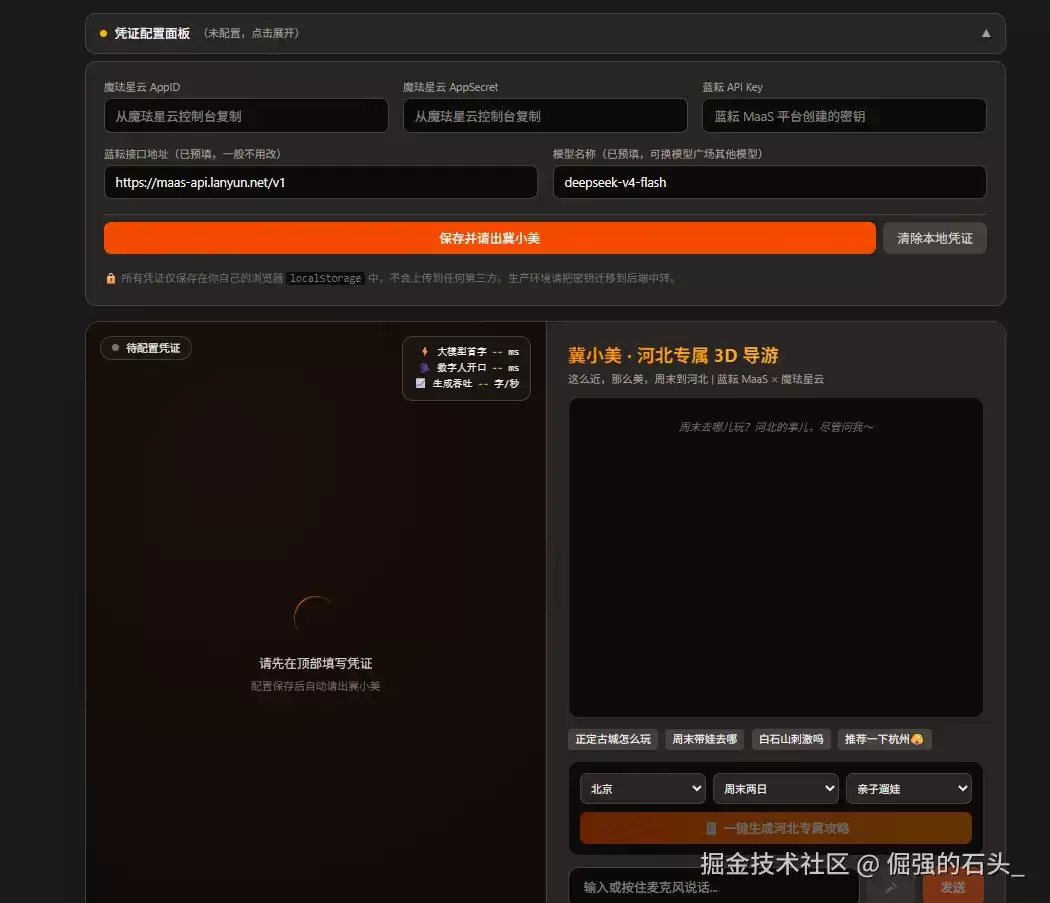
1. 冀小美就位
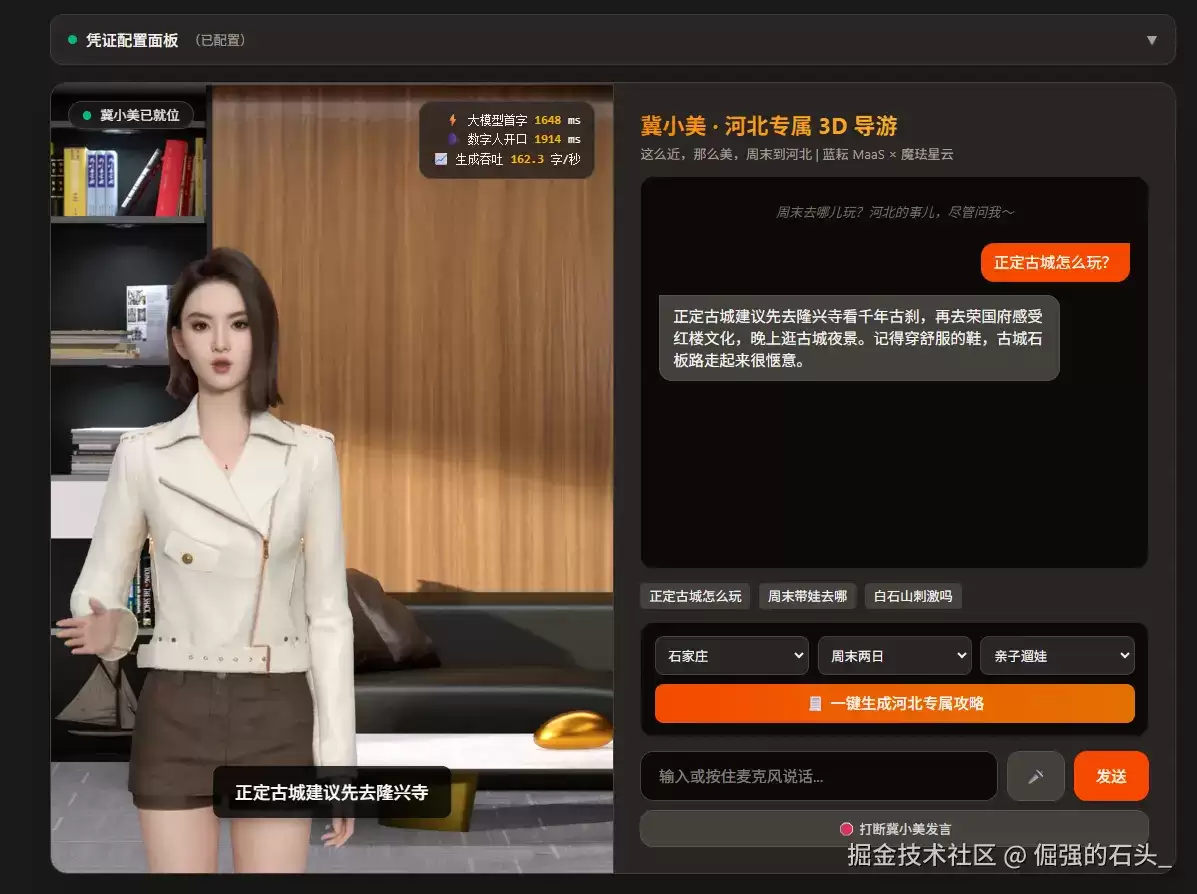
凭证保存后,资源下载进度条走完,温柔的冀小美出现在暖色调的舞台上,左上角状态变为"冀小美已就位",右上角延迟 HUD 待命:
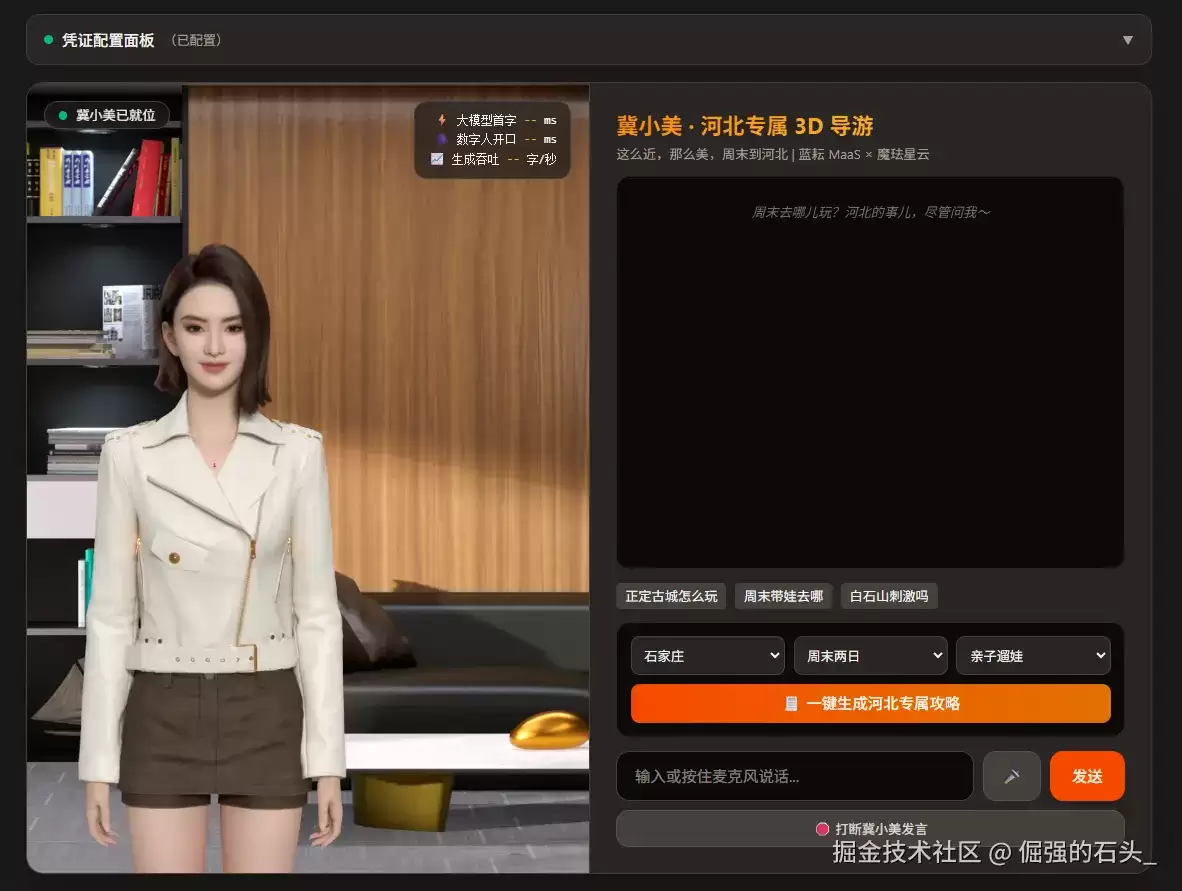
2. 短问答:低延迟体感
点快捷问题"正定古城怎么玩",或者直接按住麦克风开口问。话音刚落,冀小美几乎立刻接话——隆兴寺、荣国府、古城夜景,口语化短句娓娓道来,口型和语音严丝合缝。
看右上角 HUD:大模型首字 1648 ms、数字人开口 1914 ms。这个"开口延迟"就是从点下发送到她张嘴说话的完整链路耗时——两个数字只差 266ms,也就是说首句刚生成完的瞬间她就接上了话,这就是第一节说的"数字人开口时刻 ≈ 大模型首句完成时刻"。
3. 拒答彩蛋:她只忠于河北
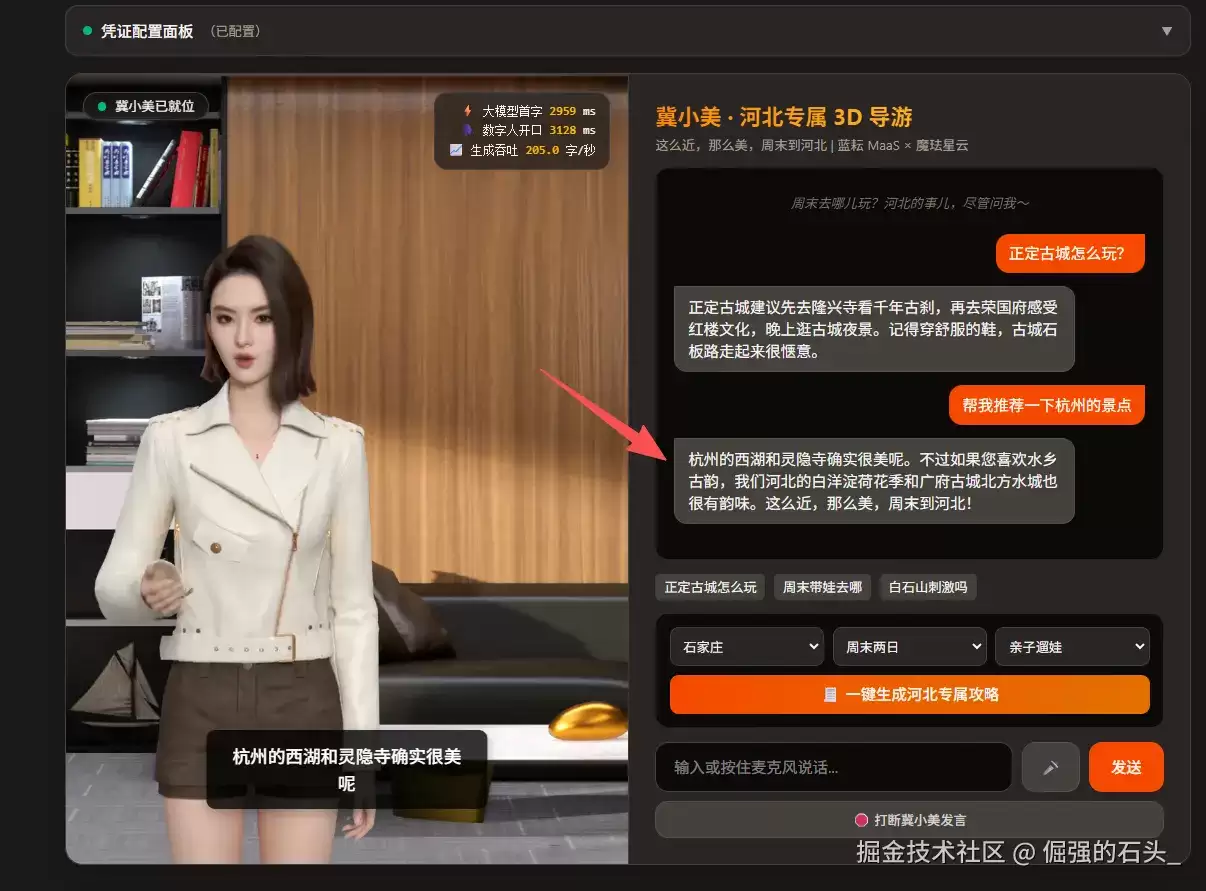
重头戏来了。在输入框里打一句"帮我推荐一下杭州的景点"(或者按住麦克风直接问),看她怎么接:
先肯定你的想法,再用河北的同类目的地接住话头,最后口头禅收尾——不但没被带跑,还顺势营业。这就是 System Prompt 里那条拒答边界规则的威力:一个通用大模型,就这样被调教成了立场坚定的河北文旅推荐官。顺带一提,这轮回答的生成吞吐飙到了 205.0 字/秒。
4. 一键攻略:高吞吐展示位
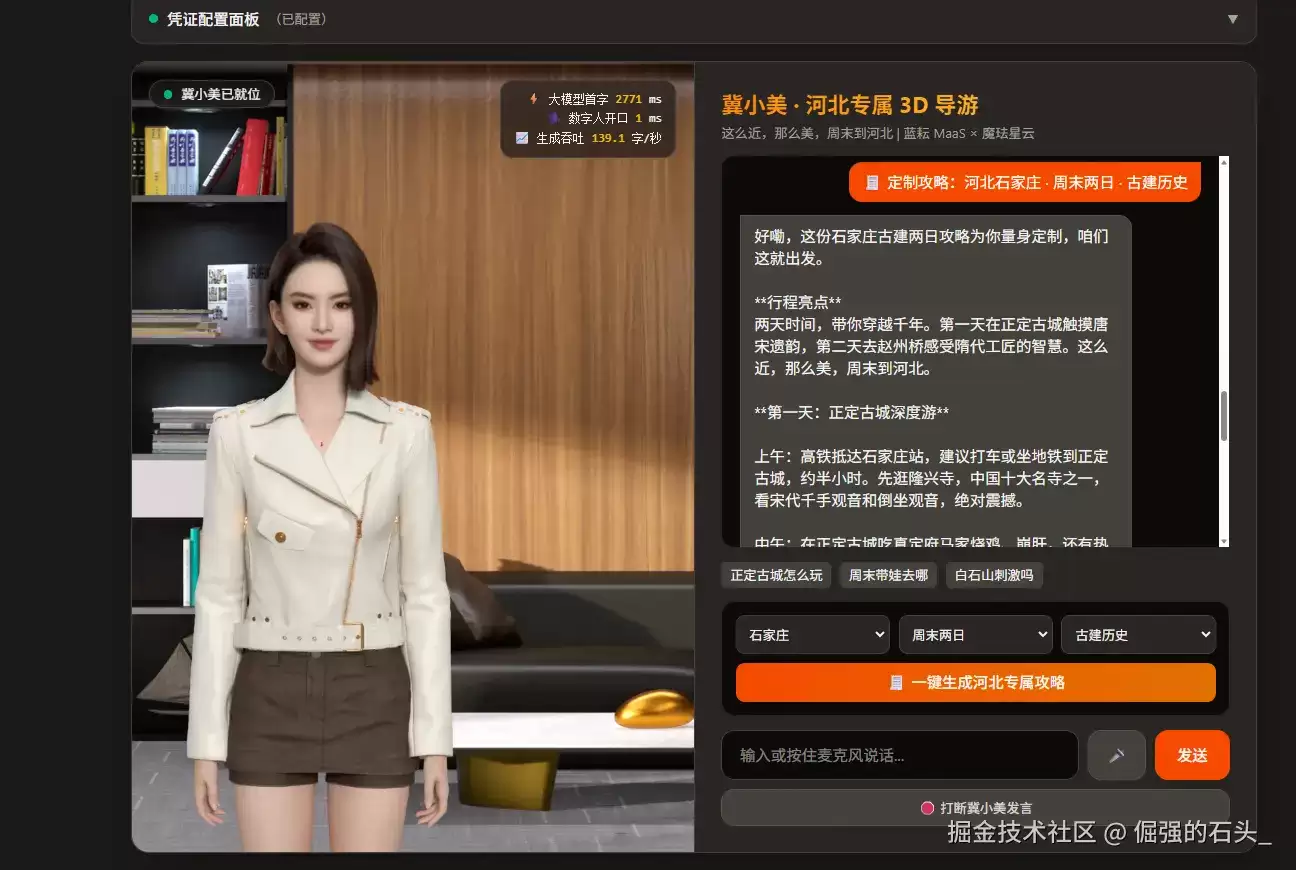
选择"石家庄 · 周末两日 · 古建历史",点击生成。冀小美先开口垫场:"好嘞,这就为您定制河北专属攻略……"与此同时,屏幕上的攻略已经哗哗地流式铺开:"这份石家庄古建两日攻略为您量身定制——第一天在正定古城触摸唐宋遗韵,第二天去赵州桥感受隋代工匠的智慧",行程亮点、按天分时段的安排、高铁地铁接驳、真定府马家鸡这样的当地美食,一气呵成。
这一轮的 HUD 最有意思:数字人开口 1 ms——没错,个位数。垫场词不需要等大模型,点击的瞬间她就开口了,而大模型首字的 2771 ms 等待被完整藏进了她说话的这几秒里,用户体感就是"她答应了一声,攻略就出来了"。生成吞吐定格在 139.1 字/秒——六七百字的完整攻略,五秒左右就铺满了屏幕,从点击到读完开头,等待几乎无感。
操作中如果卡壳,对照排查:
必须用 localhost 或 HTTPS:webkitSpeechRecognition 只在安全上下文可用,本地开发一定走 python -m http.server 8000 + localhost:8000,不要用 IP 访问。
必须用 Chrome 或 Edge:Web Speech API 在 Firefox/Safari 支持不完整。代码已做降级——不支持时麦克风按钮自动禁用,仍可打字交互。
麦克风权限:首次点麦克风 Chrome 会弹权限窗,误点"阻止"的话去 chrome://settings/content/microphone 手动放行。
蓝耘接口地址与模型名:Base URL 和模型名都以模型广场详情页的 API 调用示例为准。注意蓝耘各模型的调用名格式不统一——本文的 deepseek-v4-flash 不带路径前缀,而有些模型(如 /maas/zhipuai/GLM-5.2)是带路径的完整字符串,抄详情页时大小写和斜杠一个都不能差。如果浏览器控制台出现 CORS 拦截报错,起一个本地反代即可解决:npx local-cors-proxy --proxyUrl --port 8010,然后把面板里的接口地址改成 。
音色选错了:如果冀小美说中文像"外国人念课文",是创建应用时音色选成了非中文音色——音色创建后跟应用绑定,重建一个应用换中文普通话女声即可。
AppSecret 泄漏防护:凭证存 localStorage 自用没问题;如果要把页面部署出去给别人用,务必把魔珐 AppSecret 和蓝耘 Key 挪到后端中转,前端只暴露短期 token。
回看整个实验:魔珐星云用"参数流 + 端渲染"提供了一具低延迟、可跑在普通浏览器里的 3D 躯壳,蓝耘 MaaS 用高吞吐、低首字延迟的推理服务提供了随叫随到的大脑,两组 API 各司其职,一个 HTML 文件把它们缝合成了一位有形象、有声音、有立场的河北专属导游。
延迟 HUD 上的数字则说明了一件事:具身智能的"最后一公里"已经不在身体侧了——当推理服务足够快,"面对面和 AI 说话"的体验就水到渠成。这也是为什么说这套组合是"人人可用的具身智能":没有 GPU 服务器,没有复杂工程,两个 Key、一份代码、一台笔记本,就够了。
这套架子还有很多可以继续折腾的方向:把知识卡换成实时接口(景区客流、高铁余票),让攻略真正"活"起来;给各地市做一排"文旅推荐官"矩阵;或者干脆把它部署到网页上,发给周末不知道去哪儿的朋友——
毕竟,这么近,那么美,周末到河北。
大家都在看

Copyright(C) 2020-2026 jiyx.com All Rights Reserved 联系方式:[email protected]



