


平时做技术实践时,很多问题不是概念不会,而是细节没串起来。拿“SpringBoot调用Claude API的完整代码示例”来说,它看着像小点,放到项目里常会牵出环境、配置、兼容性和维护成本。下面按实际使用顺序,把思路、关键写法和容易踩坑的地方讲清楚,方便你直接对照操作。
一句话总结:本文提供Spring Boot调用Claude API的完整代码,覆盖同步调用、SSE流式输出、多轮对话,可直接复制运行。
一、Claude vs OpenAI:为什么选Claude?
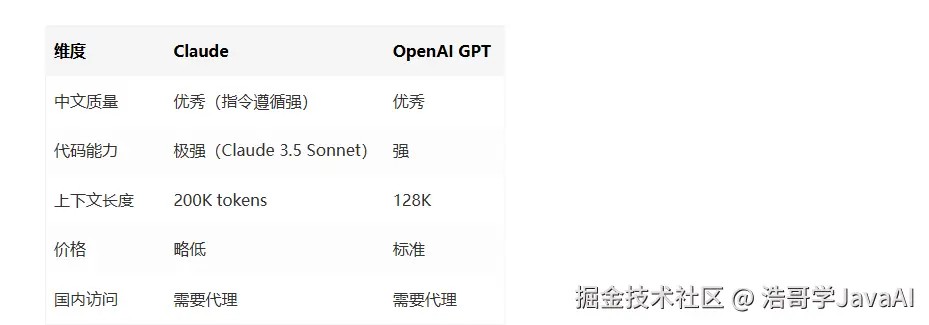
Claude特别适合:长文档分析、复杂代码生成、需严格遵循格式的场景。
二、依赖引入
        org.springframework.boot
        spring-boot-starter-webflux


        org.springframework.ai
        spring-ai-anthropic-spring-boot-starter
        1.0.0


        org.projectlombok
        lombok
        true
三、设置文件
# application.yml
anthropic:
  api-key: ${ANTHROPIC_API_KEY}
  base-url: https://api.anthropic.com
  version: 2023-06-01  # API版本
  model: claude-3-5-sonnet-20241022  # 最新模型
  max-tokens: 4096
  temperature: 0.7
# 超时配置
spring:
  webflux:
    client:
      connect-timeout: 30000
      read-timeout: 60000
四、核心代码
4.1 设置类:ClaudeClientConfig
import org.springframework.beans.factory.annotation.Value;
import org.springframework.context.annotation.Bean;
import org.springframework.context.annotation.Configuration;
import org.springframework.web.reactive.function.client.WebClient;
import reactor.core.publisher.Mono;

@Configuration
public class ClaudeClientConfig {

    @Value("${anthropic.api-key}")
    private String apiKey;

    @Value("${anthropic.base-url:https://api.anthropic.com}")
    private String baseUrl;

    @Value("${anthropic.version:2023-06-01}")
    private String apiVersion;

    @Bean
    public WebClient claudeWebClient() {
        return WebClient.builder()
            .baseUrl(baseUrl)
            .defaultHeader("x-api-key", apiKey)
            .defaultHeader("anthropic-version", apiVersion)
            .defaultHeader("Content-Type", "application/json")
            .build();
    }
}
4.2 同步调用:ClaudeChatService
import org.springframework.beans.factory.annotation.Autowired;
import org.springframework.beans.factory.annotation.Value;
import org.springframework.stereotype.Service;
import org.springframework.web.reactive.function.client.WebClient;
import reactor.core.publisher.Mono;
import lombok.Data;
import java.util.List;

@Service
public class ClaudeChatService {

    @Autowired
    private WebClient claudeWebClient;

    @Value("${anthropic.model:claude-3-5-sonnet-20241022}")
    private String model;

    @Value("${anthropic.max-tokens:4096}")
    private int maxTokens;

    /**
     * 同步单轮对话
     */
    public String chat(String message) {
        ClaudeRequest request = new ClaudeRequest();
        request.setModel(model);
        request.setMaxTokens(maxTokens);
        request.setMessages(List.of(
            new Message("user", message)
        ));

        ClaudeResponse response = claudeWebClient.post()
            .uri("/v1/messages")
            .bodyValue(request)
            .retrieve()
            .bodyToMono(ClaudeResponse.class)
            .block();  // 同步阻塞

        return extractContent(response);
    }

    /**
     * 同步多轮对话
     */
    public String chatWithHistory(List history, String newMessage) {
        history.add(new Message("user", newMessage));

        ClaudeRequest request = new ClaudeRequest();
        request.setModel(model);
        request.setMaxTokens(maxTokens);
        request.setMessages(history);

        ClaudeResponse response = claudeWebClient.post()
            .uri("/v1/messages")
            .bodyValue(request)
            .retrieve()
            .bodyToMono(ClaudeResponse.class)
            .block();

        // 把AI回复加入历史
        history.add(new Message("assistant", extractContent(response)));

        return extractContent(response);
    }

    private String extractContent(ClaudeResponse response) {
        if (response == null || response.getContent() == null || response.getContent().isEmpty()) {
            return "";
        }
        return response.getContent().get(0).getText();
    }

    // DTO类
    @Data
    public static class ClaudeRequest {
        private String model;
        private int maxTokens;
        private List messages;
    }

    @Data
    public static class Message {
        private String role;  // "user" or "assistant"
        private String content;

        public Message(String role, String content) {
            this.role = role;
            this.content = content;
        }
    }

    @Data
    public static class ClaudeResponse {
        private String id;
        private String model;
        private List content;
        private Usage usage;
    }

    @Data
    public static class ContentBlock {
        private String type;  // "text"
        private String text;
    }

    @Data
    public static class Usage {
        private int inputTokens;
        private int outputTokens;
    }
}
4.3 流式调用:ClaudeStreamService(SSE)
import org.springframework.beans.factory.annotation.Autowired;
import org.springframework.stereotype.Service;
import org.springframework.web.reactive.function.client.WebClient;
import reactor.core.publisher.Flux;
import com.fasterxml.jackson.databind.ObjectMapper;
import lombok.Data;
import java.util.List;

@Service
public class ClaudeStreamService {

    @Autowired
    private WebClient claudeWebClient;

    @Autowired
    private ObjectMapper objectMapper;

    /**
     * 流式对话(SSE)
     * 返回Flux,每个元素是一个token片段
     */
    public Flux chatStream(String message) {
        ClaudeRequest request = new ClaudeRequest();
        request.setModel("claude-3-5-sonnet-20241022");
        request.setMaxTokens(4096);
        request.setMessages(List.of(new Message("user", message)));
        request.setStream(true);  // 关键:开启流式

        return claudeWebClient.post()
            .uri("/v1/messages")
            .bodyValue(request)
            .retrieve()
            .bodyToFlux(String.class)  // 按行读取SSE数据
            .filter(line -> line.startsWith("data:"))  // 只处理data:行
            .map(line -> line.substring(5).trim())  // 去掉"data: "前缀
            .filter(data -> !data.equals("[DONE]"))  // 过滤结束标记
            .map(this::extractDeltaText)
            .filter(text -> text != null && !text.isEmpty());
    }

    /**
     * 从SSE事件中提取文本增量
     */
    private String extractDeltaText(String jsonData) {
        try {
            StreamEvent event = objectMapper.readValue(jsonData, StreamEvent.class);
            if ("content_block_delta".equals(event.getType()) && event.getDelta() != null) {
                return event.getDelta().getText();
            }
            return "";
        } catch (Exception e) {
            return "";
        }
    }

    // 流式事件DTO
    @Data
    public static class StreamEvent {
        private String type;  // "content_block_delta", "message_start", etc.
        private String index;
        private Delta delta;
    }

    @Data
    public static class Delta {
        private String type;  // "text_delta"
        private String text;  // 实际的文本增量
    }

    // 复用ClaudeChatService的DTO
    @Data
    public static class ClaudeRequest {
        private String model;
        private int maxTokens;
        private List messages;
        private boolean stream;
    }

    @Data
    public static class Message {
        private String role;
        private String content;

        public Message(String role, String content) {
            this.role = role;
            this.content = content;
        }
    }
}
4.4 Controller层:REST API暴露
import org.springframework.beans.factory.annotation.Autowired;
import org.springframework.http.MediaType;
import org.springframework.web.bind.annotation.*;
import reactor.core.publisher.Flux;
import reactor.core.publisher.Mono;
import java.util.ArrayList;
import java.util.List;

@RestController
@RequestMapping("/api/claude")
public class ClaudeController {

    @Autowired
    private ClaudeChatService chatService;

    @Autowired
    private ClaudeStreamService streamService;

    /**
     * 同步对话
     */
    @PostMapping("/chat")
    public Mono chat(@RequestBody ChatRequest request) {
        return Mono.just(chatService.chat(request.getMessage()));
    }

    /**
     * 流式对话(SSE)
     */
    @PostMapping(value = "/chat/stream", produces = MediaType.TEXT_EVENT_STREAM_VALUE)
    public Flux chatStream(@RequestBody ChatRequest request) {
        return streamService.chatStream(request.getMessage());
    }

    /**
     * 多轮对话(带历史)
     */
    private final List conversationHistory = new ArrayList<>();

    @PostMapping("/chat/history")
    public Mono chatWithHistory(@RequestBody ChatRequest request) {
        String response = chatService.chatWithHistory(conversationHistory, request.getMessage());
        return Mono.just(response);
    }

    @PostMapping("/chat/history/clear")
    public Mono clearHistory() {
        conversationHistory.clear();
        return Mono.just("历史记录已清空");
    }

    @Data
    public static class ChatRequest {
        private String message;
    }
}
五、测试验证
5.1 同步调用测试
curl -X POST http://localhost:8080/api/claude/chat -H "Content-Type: application/json" -d '{"message": "用Java写一个单例模式,要求线程安全"}'5.2 流式调用测试(SSE)
curl -X POST http://localhost:8080/api/claude/chat/stream   -H "Content-Type: application/json"   -d '{"message": "讲一个程序员笑话"}'
# 输出:
# data: 有
# data: 一
# data: 个
# data: 程序员...
5.3 前端EventSource消费
const eventSource = new EventSource('/api/claude/chat/stream', {
  method: 'POST',
  body: JSON.stringify({message: '你好'})
});
eventSource.onmessage = (event) => {
  console.log('收到:', event.data);
  appendToUI(event.data);  // 追加到页面
};
eventSource.onerror = () => {
  console.log('连接结束');
  eventSource.close();
};
六、与OpenAI对比
@Service
public class AIChatService {

    @Autowired
    private ClaudeChatService claudeService;

    // 可切换的AI Provider
    public String chat(String provider, String message) {
        switch (provider) {
            case "claude":
                return claudeService.chat(message);
            case "openai":
                // return openAIService.chat(message);
            default:
                return claudeService.chat(message);
        }
    }
}
七、常用问题
7.1 403 Forbidden
Claude API需申请访问权限,新账户可能无法直接调用。
解决:在Anthropic官网申请API访问,或采用第三方代理。
7.2 流式输出乱码
理解这一步时,SSE事件格式与OpenAI不同,注意解析content_block_delta事件。
7.3 上下文长度超限
Claude 3.5兼容200K tokens,但超过后会被截断。
解决:实现滑动窗口历史管理,只保留最近N轮对话。
八、完整项目结构
claude-java-demo/
├── pom.xml
├── src/
│   ├── main/
│   │   ├── java/
│   │   │   └── com/example/claude/
│   │   │       ├── ClaudeJavaDemoApplication.java
│   │   │       ├── config/
│   │   │       │   └── ClaudeClientConfig.java
│   │   │       ├── service/
│   │   │       │   ├── ClaudeChatService.java
│   │   │       │   └── ClaudeStreamService.java
│   │   │       └── controller/
│   │   │           └── ClaudeController.java
│   │   └── resources/
│   │       └── application.yml
│   └── test/
│       └── java/
│           └── ClaudeChatServiceTest.java
结合项目来看,总的来说,SpringBoot调用Claude API这部分内容适合结合实际项目边做边理解。先抓住核心思路,再逐步补上细节和边界处理,最后效果会更稳定,也更容易复用。
