


真人照片转二次元后怎么换画风?原照与二次元成图的两种用法
2026-11-21
2026-11-26 0
要让标准索引的合成 _source 保留数组顺序和重复元素,建索引时先在 settings 中把 index.mapping.source.mode 设为 synthetic,再将 index.mapping.synthetic_source_keep 设为 arrays。
在 Kibana 打开 Dev Tools → Console,依次运行下面的请求。本例使用具备试用许可的 Elasticsearch 8.19.0 测试节点和标准索引。三个索引的 labels 都是普通 keyword,写入内容相同。
PUT /keep-arrays
{
  "settings": {
    "index.mapping.source.mode": "synthetic",
    "index.number_of_replicas": 0,
    "index.mapping.synthetic_source_keep": "arrays"
  },
  "mappings": {
    "properties": {
      "labels": {
        "type": "keyword"
      }
    }
  }
}
写入文档后,用 GET /keep-arrays/_source/1 直接读取重建结果。这里读取的是文档的 _source。
PUT /keep-arrays/_doc/1
{
  "labels": [
    "warn",
    "info",
    "warn"
  ]
}

GET /keep-arrays/_source/1
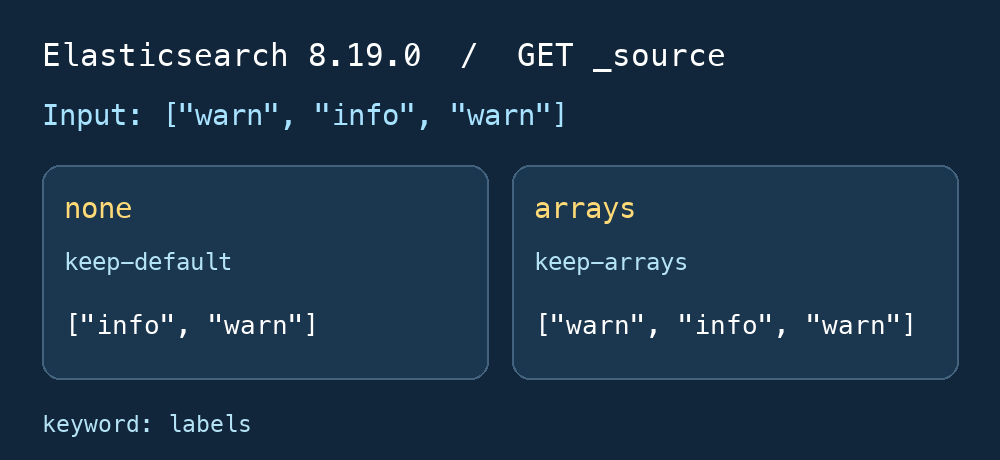
实测返回的 labels 仍按 warn、info、warn 排列。
{
  "labels": [
    "warn",
    "info",
    "warn"
  ]
}在本例使用的标准索引模式中,省略 index.mapping.synthetic_source_keep 时使用 none。保留合成模式、字段类型和写入内容,只移除这一项。
PUT /keep-default
{
  "settings": {
    "index.mapping.source.mode": "synthetic",
    "index.number_of_replicas": 0
  },
  "mappings": {
    "properties": {
      "labels": {
        "type": "keyword"
      }
    }
  }
}

PUT /keep-default/_doc/1
{
  "labels": [
    "warn",
    "info",
    "warn"
  ]
}

GET /keep-default/_source/1
这次返回 ["info", "warn"]。普通 keyword 在这条重建路径中按字典顺序返回唯一值。这个结果只描述这里使用的字段和映射,其他字段类型的重建规则可能不同。
如果索引内大部分数组都要保留,个别字段仍可在映射里显式设置 synthetic_source_keep: none。下面只给第一节的 labels 加上这条覆盖。
PUT /keep-override
{
  "settings": {
    "index.mapping.source.mode": "synthetic",
    "index.number_of_replicas": 0,
    "index.mapping.synthetic_source_keep": "arrays"
  },
  "mappings": {
    "properties": {
      "labels": {
        "type": "keyword",
        "synthetic_source_keep": "none"
      }
    }
  }
}

PUT /keep-override/_doc/1
{
  "labels": [
    "warn",
    "info",
    "warn"
  ]
}

GET /keep-override/_source/1
虽然索引级别仍为 arrays,这个字段实测返回 ["info", "warn"]。配置处于索引层还是字段层,决定了它的作用范围。
索引级用 arrays 可以批量保留数组顺序和重复元素。复杂数组的 JSON 外形仍可能变化,例如多层数组可能被展平。需要保留某个字段的单值和数组原形,或某个对象及其子对象和字段时,可在该字段或对象的映射里使用 synthetic_source_keep: all。
如果业务读取依赖数组顺序和重复值,可在新索引中选择 arrays,并用实际文档检查磁盘开销。要完整保留个别字段或对象,可单独配置 all。迁移时先准备目标索引,再重建文档。源索引已丢失的数组顺序和重复值需要从原始数据恢复。

Copyright(C) 2020-2026 jiyx.com All Rights Reserved 联系方式:[email protected]