


真人照片转二次元后怎么换画风?原照与二次元成图的两种用法
2026-11-21
2026-11-25 0
用 Elasticsearch 9.3.0 创建 dense_vector 字段时,可以只指定向量维度,让 Elasticsearch 补齐 index_options。默认浮点向量在 383 维采用 int8_hnsw,从 384 维起采用 bbq_hnsw。如果要指定 int4,把类型写成 int4_hnsw。文档向量与查询向量都保持浮点格式。
在 Kibana 的 Dev Tools → Console 中运行下面两条请求。映射只保存业务字段名、维度和相似度,向量索引类型由 Elasticsearch 补齐。这里用独立的空索引演示,请使用尚未占用的索引名。
PUT /dv-demo-quick
{
  "mappings": {
    "properties": {
      "embedding": {
        "type": "dense_vector",
        "dims": 384,
        "similarity": "cosine"
      }
    }
  }
}

GET /dv-demo-quick/_mapping
展开 mappings.properties.embedding.index_options.type,在 9.3.0 上应看到 bbq_hnsw。如果要固定为 int8、int4 或 BBQ,在 embedding 里增加 index_options 对象,其 type 分别填 int8_hnsw、int4_hnsw 或 bbq_hnsw,随后创建目标索引。
这一轮用一组易于判断相似度的样本,同时验证索引和查询。将脚本连接到回环地址的 19273 端口,并在本地测试实例上运行 Python 3。脚本仅使用标准库,首次运行请确认示例索引名未占用。每组实验都读取映射、写入两个向量,再检查 kNN 第一名。
import json
from urllib.error import HTTPError
from urllib.request import Request, urlopen

BASE = "http://" + "127.0.0.1:19273"

def api(method, path, body=None):
    request = Request(
        BASE + path,
        data=json.dumps(body).encode() if body is not None else None,
        headers={"Content-Type": "application/json"},
        method=method,
    )
    with urlopen(request, timeout=20) as response:
        return json.load(response)

cases = [
    ("auto-128", 128, None, "int8_hnsw"),
    ("auto-383", 383, None, "int8_hnsw"),
    ("auto-384", 384, None, "bbq_hnsw"),
    ("explicit-int8", 384, "int8_hnsw", "int8_hnsw"),
    ("explicit-int4", 384, "int4_hnsw", "int4_hnsw"),
    ("explicit-bbq", 384, "bbq_hnsw", "bbq_hnsw"),
]

def mapping(dims, strategy):
    field = {"type": "dense_vector", "dims": dims, "similarity": "cosine"}
    if strategy is not None:
        field["index_options"] = {"type": strategy}
    return {"mappings": {"properties": {"embedding": field}}}

print("Elasticsearch", api("GET", "/")["version"]["number"])
print(f"{'CASE':<18}{'DIMS':>5}  {'INDEX TYPE':<13}TOP HIT")
for case, dims, strategy, expected in cases:
    name = f"dv-demo-{case}"
    api("PUT", f"/{name}", mapping(dims, strategy))
    fields = api("GET", f"/{name}/_mapping")[name]["mappings"]["properties"]
    actual = fields["embedding"]["index_options"]["type"]
    assert actual == expected, (case, actual)

    def vector(x, y):
        return [x, y] + [0.0] * (dims - 2)

    for doc_id, v in [("near", vector(1.0, 0.1)), ("far", vector(0.1, 1.0))]:
        api("PUT", f"/{name}/_doc/{doc_id}?refresh=wait_for", {"embedding": v})

    result = api("POST", f"/{name}/_search", {
        "size": 1,
        "_source": False,
        "knn": {
            "field": "embedding",
            "query_vector": vector(1.0, 0.0),
            "k": 1,
            "num_candidates": 2,
        },
    })
    top = result["hits"]["hits"][0]["_id"]
    assert top == "near", (case, top)
    print(f"{case:<18}{dims:>5}  {actual:<13}{top}")

for dimensions, kind in [(127, "int4_hnsw"), (63, "bbq_hnsw"), (64, "bbq_hnsw")]:
    label = f"{kind} / {dimensions} dims"
    try:
        api("PUT", f"/dv-demo-boundary-{dimensions}", mapping(dimensions, kind))
    except HTTPError as error:
        assert error.code == 400 and dimensions != 64
        print(f"{label}: HTTP {error.code}")
    else:
        assert dimensions == 64
print(f"{label}: accepted")每种配置下,near 的前两维为 [1.0, 0.1],far 为 [0.1, 1.0],其余维度补零。查询向量从 [1.0, 0.0] 开始。refresh=wait_for 让写入在查询前对搜索可见。六次搜索的头名都应为 near,而实际量化类型以返回的映射为准。两条样本只验证配置与查询链路。
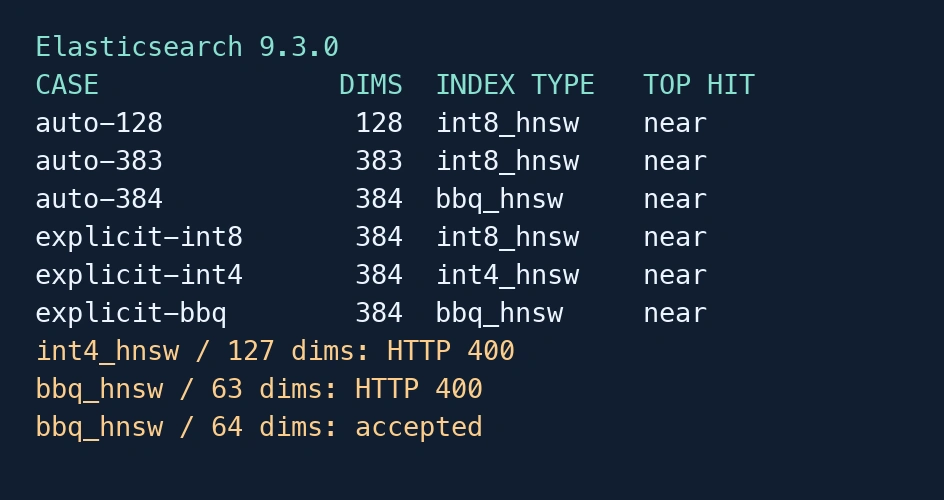
Elastic Stack 9.1 至 9.3 的新建索引,默认浮点字段在维度达到 384 时选择 bbq_hnsw,低于 384 时选择 int8_hnsw。9.0 对浮点向量默认使用 int8_hnsw。此规则随索引创建版本变化,跨版本时应读取实际字段映射。测试中的 383 和 384 维恰好落在阈值两侧。
Elastic Stack 9.4 起,如果订阅允许使用 DiskBBQ,新建浮点字段默认可用 bbq_disk。低于 384 维时,该默认配置可使用 bits: 4 的四位编码,映射类型仍是 bbq_disk。要固定为 HNSW 的 int4 类型,仍应显式设置 int4_hnsw。element_type: byte 或 bit 则对应已经按该格式提供的向量,默认使用 hnsw。
显式选择 int4_hnsw 时,维度必须为偶数,127 维的创建请求返回 HTTP 400。在实测的 9.3.0 上,显式的 bbq_hnsw 接受 64 维,63 维返回 HTTP 400。384 维是这组版本的自动选择阈值,显式选择 BBQ 时按该类型的最低维度检查。
沿用版本默认值时,建好索引后读回映射即可确认。希望几个环境采用同一策略时,显式配置类型,并在自己的数据上比较 Recall@k、查询延迟以及磁盘占用。以 float32 向量的编码本体计算,int8、int4 和 BBQ 每维分别约用 8、4 和 1 位。总开销还包括 HNSW 图、量化附加数据和磁盘上保留的原始向量。若 BBQ 候选的排序偏差较大,可以评估扩大候选并用原始向量重排的效果。
已有数据需要统一切换量化方式时,可先建一个带目标映射的新索引,再重建索引数据并验证查询结果,最后切换业务别名。只升级集群不会让旧索引中已有的向量自动按新默认值重新编码。

Copyright(C) 2020-2026 jiyx.com All Rights Reserved 联系方式:[email protected]