


真人照片转二次元后怎么换画风?原照与二次元成图的两种用法
2026-11-21
2026-11-26 0
配置 geo_point 后仍查不到地点,建议先确认请求打到的实际索引,再看文档的坐标有没有进入索引。碰到字段报错就核对全路径和别名。请求成功但返回零条,就从 exists、坐标顺序和搜索半径查起。
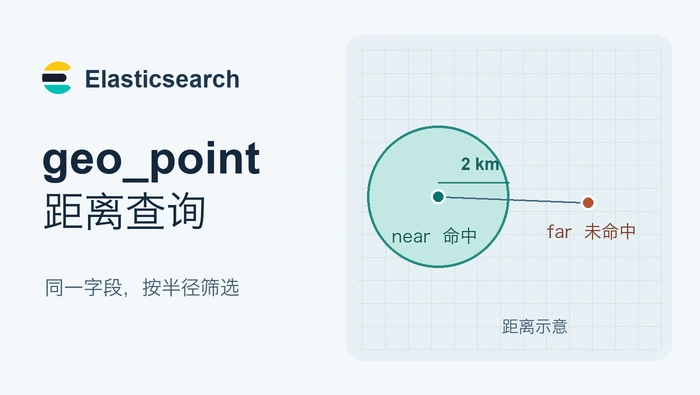
以下命令在 Elasticsearch 8.19.0 实测,可按顺序粘贴到 Kibana 的 Dev Tools → Console。使用临时索引,并确认示例名称尚未被占用。先写三个合成文档,只保留距离过滤条件,确认搜索逻辑能独立运行。
PUT geo-demo-v1
{
  "mappings": {
    "properties": {
      "store": {
        "properties": {
          "location": {
            "type": "geo_point"
          }
        }
      }
    }
  }
}

PUT geo-demo-v1/_doc/near?refresh=wait_for
{
  "name": "near",
  "store": {
    "location": {
      "lat": 48.8584,
      "lon": 2.2945
    }
  }
}

PUT geo-demo-v1/_doc/far?refresh=wait_for
{
  "name": "far",
  "store": {
    "location": [
      2.3522,
      48.8566
    ]
  }
}

PUT geo-demo-v1/_doc/no-point?refresh=wait_for
{
  "name": "no point"
}

GET geo-demo-v1/_search
{
  "query": {
    "bool": {
      "filter": [
        {
          "geo_distance": {
            "distance": "2km",
            "store.location": {
              "lat": 48.8584,
              "lon": 2.2945
            }
          }
        }
      ]
    }
  }
}预期命中一条,hits.hits[0]._id 为 near。far 在约 4.2 公里之外,no-point 缺少坐标。refresh=wait_for 让测试写入等到搜索可见,避免刚写完时误判。
在样例中把过滤条件的字段改成 location,查询会返回 HTTP 400。正文里写入的是 store.location,查询也要使用完整路径。先对应用实际搜索的索引查映射。如果应用用通配符,使用 _field_caps 汇总目标索引的类型。
GET geo-demo-v1/_mapping/field/store.location

GET geo-demo-v*/_field_caps?fields=store.location&include_unmapped=true
检查返回的字段名及其 type。如果刚改的是索引模板,模板会在创建匹配的新索引时应用。已有索引的字段类型需要单独核对。
搜索成功时先看 _shards.failed。分片无失败且零命中时,执行下面的 exists 统计。示例应返回 count: 2,说明三份文档里两份有可查询的坐标。如果计数为零,回查写入回执以及应用是否读写同一索引。
GET geo-demo-v1/_count
{
  "query": {
    "exists": {
      "field": "store.location"
    }
  }
}
有值时,优先用带键名的 {"lat":48.8584,"lon":2.2945} 写查询中心。数组按 [lon, lat],逗号字符串按 "lat,lon"。本例反过来写数组,两项仍在合法范围,因此查询会成功,但中心移到了别处,实际返回零命中。
GET geo-demo-v1/_search
{
  "query": {
    "bool": {
      "filter": [
        {
          "geo_distance": {
            "distance": "2km",
            "store.location": [
              48.8584,
              2.2945
            ]
          }
        }
      ]
    }
  }
}
换回对象写法后重跑基线。基线有结果而业务请求仍无结果时,把原查询的其他过滤条件逐项加回,并核对距离单位。
同一别名可匹配多个索引。一个索引有 geo_point,另一个索引没声明该字段,距离查询就可能出现分片失败。下列代码先构造这种别名,再分别检查两个索引并对比查询行为。
PUT geo-demo-empty
{
  "mappings": {
    "properties": {
      "name": {
        "type": "keyword"
      }
    }
  }
}

POST _aliases
{
  "actions": [
    {
      "add": {
        "index": "geo-demo-v1",
        "alias": "geo-demo-read"
      }
    },
    {
      "add": {
        "index": "geo-demo-empty",
        "alias": "geo-demo-read"
      }
    }
  ]
}

GET _alias/geo-demo-read

GET geo-demo-read/_field_caps?fields=store.location&include_unmapped=true

GET geo-demo-read/_search?allow_partial_search_results=false
{
  "query": {
    "bool": {
      "filter": [
        {
          "geo_distance": {
            "distance": "2km",
            "store.location": {
              "lat": 48.8584,
              "lon": 2.2945
            }
          }
        }
      ]
    }
  }
}
实测字段能力同时出现 geo_point 和 unmapped。为了让实验明确报错,第一个查询使用 allow_partial_search_results=false,实测返回 HTTP 400。如果缺字段的索引本来就无需参与匹配,可启用 ignore_unmapped,此时别名查询仍命中 near。
GET geo-demo-read/_search
{
  "query": {
    "bool": {
      "filter": [
        {
          "geo_distance": {
            "distance": "2km",
            "store.location": {
              "lat": 48.8584,
              "lon": 2.2945
            },
            "ignore_unmapped": true
          }
        }
      ]
    }
  }
}如果每个索引都应当提供坐标,应修正映射来源并补齐数据。ignore_unmapped 只处理字段缺失,字段已映射成不兼容类型时需要迁移。
如果 _field_caps 同时返回 keyword 和 geo_point,先给目标索引定义正确类型,再迁移。下面的旧值已经是有效的坐标字符串,重建索引时会由目标映射解析。
PUT geo-demo-legacy
{
  "mappings": {
    "properties": {
      "store": {
        "properties": {
          "location": {
            "type": "keyword"
          }
        }
      }
    }
  }
}

PUT geo-demo-legacy/_doc/near?refresh=wait_for
{
  "name": "near",
  "store": {
    "location": "48.8584,2.2945"
  }
}

GET geo-demo-legacy,geo-demo-v1/_field_caps?fields=store.location

PUT geo-demo-v2
{
  "mappings": {
    "properties": {
      "store": {
        "properties": {
          "location": {
            "type": "geo_point"
          }
        }
      }
    }
  }
}

POST _reindex?refresh=true
{
  "source": {
    "index": "geo-demo-legacy"
  },
  "dest": {
    "index": "geo-demo-v2"
  }
}

GET geo-demo-v2/_search
{
  "query": {
    "bool": {
      "filter": [
        {
          "geo_distance": {
            "distance": "2km",
            "store.location": {
              "lat": 48.8584,
              "lon": 2.2945
            }
          }
        }
      ]
    }
  }
}
实测迁移响应中 created 为 1,failures 为空,新索引查询命中 near。如果旧数据是两个独立数值字段,迁移时要先组装坐标。生产切换前核对迁移失败项、文档数和代表性地点,并处理迁移期间的增量写入,再更新应用使用的别名。
exists 核查坐标,再核对刷新、经纬度和半径。_field_caps 定位旧索引,迁移后复验。
Copyright(C) 2020-2026 jiyx.com All Rights Reserved 联系方式:[email protected]