


真人照片转二次元后怎么换画风?原照与二次元成图的两种用法
2026-11-21
2026-11-26 0
遇到 Copilot 指令缺失时,先从子目录定位 Git 根,再对照会话加载结果。主检出目录和链接工作树分别检出各自的文件。
在空的临时目录用 Bash 运行下面的实验。样例模拟主检出目录里有一份尚未提交的仓库级指令。命令创建两份检出,并在链接工作树的子目录分别检查当前目录和 Git 根。示例使用 macOS 自带的 Apple Git 2.54.0。
git init -q -b main demo
mkdir -p demo/.github demo/apps/api
printf 'Use short test names.\n' > demo/.github/copilot-instructions.md
printf 'module\n' > demo/apps/api/README.md
git -C demo add apps/api/README.md
git -C demo -c user.name=Demo -c [email protected] -c commit.gpgsign=false commit -qm baseline
git -C demo worktree add -qb review ../review
probe() (
  cd "$1"
  root=$(git rev-parse --show-toplevel)
  printf 'Git root: %s\n' "${root##*/}"
  for file in .github/copilot-instructions.md "$root/.github/copilot-instructions.md"; do
    if test -f "$file"; then result=present; else result=missing; fi
    printf '%-42s %s\n' "${file#"$root"/}" "$result"
  done
)
probe review/apps/api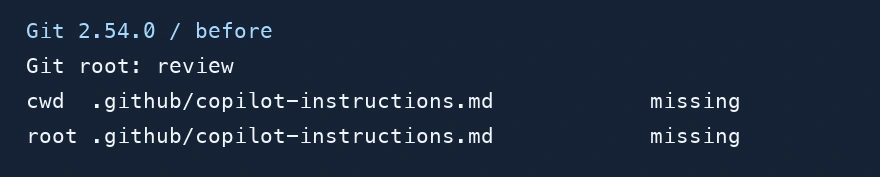
Git 根是 review。两处都显示 missing,因为创建链接工作树时检出的是当时的提交,原检出目录里的未跟踪指令还留在 demo。即使两个目录共享 Git 数据,它们各自拥有检出的文件。
继续在同一个 Bash 和临时目录运行下面的命令。示例中的 review 分支没有分叉,因此可以快进。实际项目中按团队流程把含有指令的提交纳入工作分支,再从子目录运行同样的检查。
git -C demo add .github/copilot-instructions.md
git -C demo -c user.name=Demo -c [email protected] -c commit.gpgsign=false commit -qm instructions
git -C review merge --ff-only main >/dev/null
probe review/apps/api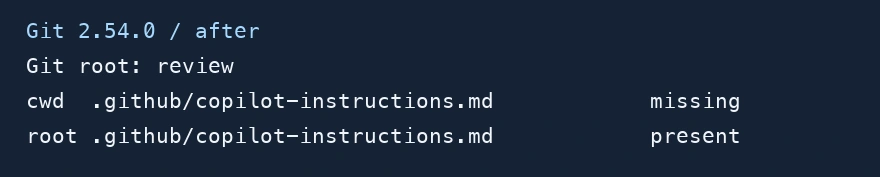
子目录的相对路径仍显示 missing,这符合预期。仓库级文件放在工作树根的 .github/copilot-instructions.md。团队规则只需随 Git 提交同步一份。
下面的会话操作依据产品文档整理。本文实验验证了 Git 路径和文件状态,本机未运行 Copilot 会话。
/instructions,查看仓库级指令是否列出并启用。CLI 也能从子目录发现 Git 根的仓库级指令。修改指令后用新会话复验。若使用 .github/instructions 下的文件,再检查 applyTo 是否匹配实际操作的文件。chat.useCustomizationsInParentRepositories,并在聊天视图的诊断中查找该文件的发现状态。这个设置面向 Local 会话,其他会话类型按各自的查找规则验证。先把文件状态核对清楚,再打开对应会话复验。指令列表和聊天诊断可以帮助定位加载环节。

Copyright(C) 2020-2026 jiyx.com All Rights Reserved 联系方式:[email protected]